

Partner promotions
Perplexity regularly runs promotional offers and the discount codes for these offers are distributed through our partners, authorized and official channels, and on our website.
How do I apply a discount code to my account?
Discount codes can only be redeemed on the web, not through the Perplexity mobile apps. To apply a code:
Visit perplexity.ai and either create a new account or sign in to your existing one.
Open the link provided in your email. You will be redirected to Perplexity, and a pop-up will confirm the validity of your discount code. Click “Get Started.”
At checkout, your discount code should be automatically applied. If it isn’t, manually enter the code from the pop-up into the “Add Promotion Code” field on the payment page. Click “Subscribe” to complete your sign-up.
Note: If you have an active subscription through the Apple App Store or Google Play, you’ll need to wait for it to end to apply a discount code.
Why do I need to provide my payment details?
Providing payment details guarantees a seamless switch to a paid subscription after your trial or discount period ends. Rest assured, you won’t be charged at sign-up. Billing will only start once the free period concludes.
You can manage your subscription anytime via your account settings page https://perplexity.coolkeypoint.com/account/details under “Manage Subscription.”
Trial promotional subscriptions - payment method required
If you’ve redeemed a trial or promotional subscription (for example, through a partner promotion), a valid payment method is required to activate and maintain your access. Here’s what you need to know:
Overall requirements
A valid credit or debit card is required for all promotional and trial redemptions.
No charges are applied during your promotional/trial period.
Unless you cancel before the trial ends, your subscription will auto-renew at the standard rate for the plan you selected during redemption (monthly or annual).
New users vs. existing users
New users are prompted to add a payment method during the sign-up and redemption flow.
Existing promotional/trial users who receive a payment method prompt must add a credit or debit card within 7 days of the original notification. If no card is added within that window, your account will be downgraded to Perplexity’s free version. Once you add a valid card, your promotional access resumes immediately. However, any missed days will not be added back to your trial period.
Where notifications appear
Email: You will receive an email notification prompting you to add a payment method.
In-app: An in-app banner will appear prompting you to add your payment information.
How do I update my payment information?
Web (desktop):
Scroll to the Subscription section.
Click Manage Plan (or Manage Subscription).
Under Billing and Shipping Information, add or update your payment method.
Note: Do not attempt to update your Perplexity payment information through the Google Play Store or Apple App Store. Doing so will create a new, separate subscription and you will be charged. Always update your payment method via the Perplexity website.
Troubleshooting carrier and partner promotions
The steps below apply to any carrier or partner promotion, including offers from telecom providers such as Airtel, Bouygues Telecom, and Vivo. For Airtel-specific redemption steps, see Perplexity Pro Airtel Promo.
My promotion is active with the partner, but my Perplexity account shows the Free plan
If your carrier or partner app shows the benefit as active but Perplexity does not show Pro, work through these checks:
Sign in with the activation email. Your promotional Pro access is tied to the Perplexity account you used when you activated the offer. If you sign in with a different email, Google, or Apple account, that account will show the Free plan. Search your inbox for a “Welcome to Pro” email to identify the correct account.
Check your payment status. Promotional subscriptions require a valid payment method. If your subscription is in a past-due state (for example, because no card was added or a card check failed), Pro can appear inactive. The partner app can still show the promotion as active during this time. Go to perplexity.ai/settings/account, open the Subscription section, and add or update your payment method. Then sign out of Perplexity and sign back in on both the app and the website to refresh your subscription status.
Treat your Perplexity account status as the source of truth. Carrier and partner apps are not always synced with Perplexity. If the partner app shows the benefit as active but your Perplexity subscription is inactive, resolve the issue on the Perplexity side using the steps above, or contact Perplexity support with your redemption confirmation.
Can I transfer a partner promotion to another account or email?
No. A partner promotion is permanently linked to the Perplexity account you used to activate it and cannot be transferred to another account or email address. Partner discount codes are single-use, so a redeemed code cannot be applied again on a different account. If you want to use Perplexity with a different email address, you can create a new account and subscribe separately. The promotional benefit stays on the original account until it expires.
Can I share this discount code with someone else?
No, discount codes are for individual use only. Sharing them violates our Terms of Service.
Can I apply multiple discount codes to one account at once?
No, only one discount code can be applied per billing cycle. To add a discount to an existing subscription, go to settings, select “Manage Subscription” in the Pro section, and choose “Update Plan.” Apply your promo code at checkout.
Can I use an expired promo code?
No, expired promo codes cannot be reactivated.
Sign-up discounts
Do you offer any discounts for signing-up?
We do not offer special discounts based on any unique conditions related to geographical location, currency, or demographic status.
Referrals program
As of November 6, 2025, the Comet Referral Program has concluded. We’re grateful to everyone who participated and shared Comet with others. Existing referral links may still be shared; however, new commissions will not be issued for referrals made after this date. The previous “Give a month, Get a month” program also ended on October 6, 2025.
Pending Commission Payouts
If you have pending payouts from the Comet Referral Program, rest assured that you will still receive payment once the standard 30-day quality review process has completed. All referrals and related commission data will be processed and paid out according to the program terms.
Frequently Asked Questions
How will I be paid?
Dub will issue all pending payments as usual once your referrals complete the 30-day review period. Please ensure your bank account is connected in the Dub dashboard.
Can I submit new referrals?
No, as of November 6, 2025, new referrals are no longer accepted. All prior qualifying referrals will still be evaluated and paid out according to the program’s final payout schedule.
What happens to my referral earnings?
Any qualified referrals completed before the shutdown will be reviewed. Pending payouts will be issued to eligible users after the review process.
Will my past referral activity still appear in Dub?
You can track performance and remaining payouts in the Dub platform until the final commissions are paid out.
What if I have questions about my payout?
For questions related to payout timing, eligibility, or payment processing, please refer to Dub support resources:
Thank you for participating in the Comet Referral Program. This was a limited time promotion, and we’re grateful for everyone who joined.
Will previously acquired Pro referrals still be honored under my account?
Yes. Please refer to the “Give a month, Get a month” Referral Program FAQ’s below.
DEPRECATED: How does the “Give a month, Get a month” Referral Program work?
To refer someone, you must be an active Perplexity Pro subscriber.
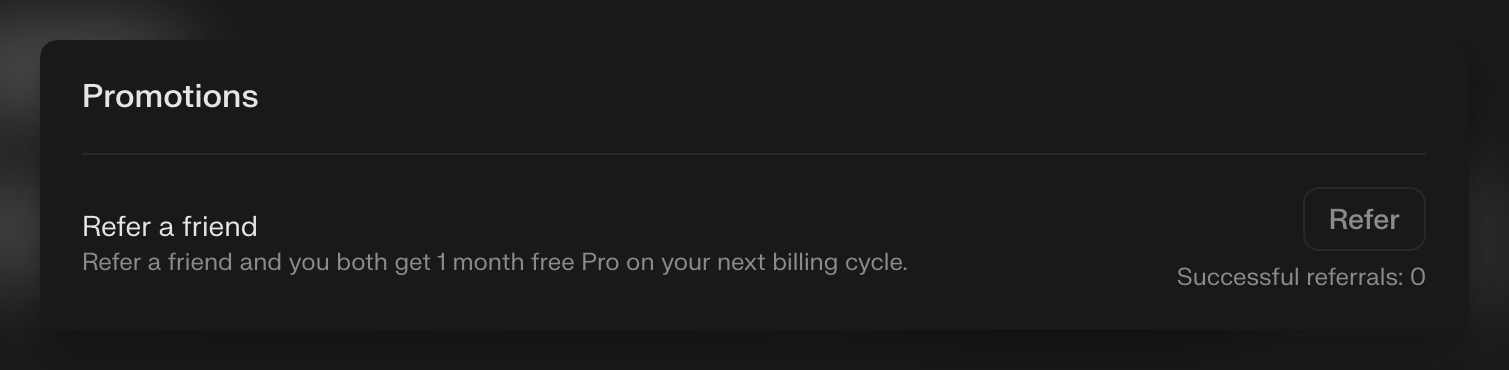
Once subscribed, you’ll receive a unique personal referral link to share with others. Visit https://perplexity.coolkeypoint.com/account/details under the Promotions section to get your unique personal referral link to share
When someone signs up for Perplexity Pro using your link, they will get one month of Pro for free and you will get one month of Pro in return. There is a cap of 12 successful redemptions per referral link.
You can refer as many people as you want, but only one referral reward is applied per billing cycle
The reward is applied as a monthly discount to your subscription - it doesn’t stack or accumulate.
For example, if you have 13 referrals and 6 have been redeemed, only the remaining 6 months will be applied to your account
For users with an active paid or promotional subscription, earned referral months will be applied after the current subscription expires.
Subscriptions through Stripe, the Google Play Store, or the Apple App Store are currently eligible to participate.
Note: This is the standard Pro Referrals program and is different from the Student Referrals program, which has been discontinued.
Managing your referrals
You can access your referral information and manage referrals directly under the Settings section of your account.
Key points to remember
You can refer up to 12 people
Only active Pro subscribers can refer others.
Only new Pro subscribers can use the referral
If I cancel my subscription, will my referrals remain recorded for future use?
No. If you cancel your subscription, your referrals will be nullified.