.%20Same%20paths%20and%20fill;%20only%20the%20viewBox%20is%20cropped%20to%20the%20file's%20own%20clip%20rect%20so%20the%20bar%20sets%20the%20clear%20space.%20--%3e%3csvg%20width='480.615'%20height='97.3693'%20viewBox='97%2078%20480.615%2097.3693'%20fill='none'%20xmlns='http://www.w3.org/2000/svg'%3e%3cg%20clip-path='url(%23clip0_1709_25672)'%3e%3cpath%20d='M507.64%20157.772C497.197%20157.772%20490.907%20152.963%20490.907%20141.818V78H503.605V97.3565H530.187L547.394%20137.712L562.584%2097.3565H577.062L544.784%20175.369H530.424L540.63%20151.907L521.406%20108.501H503.605V139.941C503.605%20144.751%20505.741%20146.628%20510.725%20146.628H522.236V157.772H507.64Z'%20fill='%23121516'/%3e%3cpath%20d='M467.845%20157.772V97.3565H480.543V157.772H467.845ZM467.489%2091.139V78H480.899V91.139H467.489Z'%20fill='%23121516'/%3e%3cpath%20d='M404.356%20157.772L425.005%20126.215L405.899%2097.3566H421.089L433.549%20118.004L446.128%2097.3566H461.318L442.212%20126.215L462.861%20157.772H447.671L433.549%20134.779L419.546%20157.772H404.356Z'%20fill='%23121516'/%3e%3cpath%20d='M377.834%20159.532C359.915%20159.532%20348.285%20146.745%20348.285%20127.271C348.285%20108.501%20360.034%2095.5968%20377.122%2095.5968C394.329%2095.5968%20405.84%20107.445%20405.84%20125.16C405.84%20127.858%20405.722%20129.852%20405.366%20131.494H361.458C362.17%20142.874%20367.747%20148.974%20377.953%20148.974C385.31%20148.974%20390.176%20145.689%20391.956%20139.237H404.891C402.043%20151.907%20391.837%20159.532%20377.834%20159.532ZM361.458%20121.64H392.905C392.193%20111.317%20386.853%20106.155%20377.122%20106.155C367.984%20106.155%20362.288%20111.903%20361.458%20121.64Z'%20fill='%23121516'/%3e%3cpath%20d='M328.431%20157.772V78H341.128V157.772H328.431Z'%20fill='%23121516'/%3e%3cpath%20d='M263.88%20175.369V97.3565H276.578V103.457C280.375%2098.4123%20287.021%2095.5968%20294.853%2095.5968C311.111%2095.5968%20321.316%20107.915%20321.316%20127.506C321.316%20147.097%20311.111%20159.532%20294.853%20159.532C287.021%20159.532%20280.375%20156.717%20276.578%20151.672V175.369H263.88ZM292.123%20148.035C302.685%20148.035%20308.263%20140.997%20308.263%20127.506C308.263%20114.132%20302.685%20107.093%20292.123%20107.093C281.443%20107.093%20275.866%20114.132%20275.866%20127.506C275.866%20140.997%20281.443%20148.035%20292.123%20148.035Z'%20fill='%23121516'/%3e%3cpath%20d='M224.479%20157.772V97.3566H237.176V103.809C239.55%2099.7028%20244.178%2097.3566%20249.874%2097.3566H258.181V109.322H249.874C241.092%20109.322%20237.176%20113.546%20237.176%20122.931V157.772H224.479Z'%20fill='%23121516'/%3e%3cpath%20d='M188.82%20159.532C170.9%20159.532%20159.271%20146.745%20159.271%20127.271C159.271%20108.501%20171.019%2095.5968%20188.107%2095.5968C205.315%2095.5968%20216.825%20107.445%20216.825%20125.16C216.825%20127.858%20216.706%20129.852%20216.35%20131.494H172.443C173.155%20142.874%20178.733%20148.974%20188.938%20148.974C196.296%20148.974%20201.161%20145.689%20202.941%20139.237H215.876C213.028%20151.907%20202.823%20159.532%20188.82%20159.532ZM172.443%20121.64H203.891C203.179%20111.317%20197.838%20106.155%20188.107%20106.155C178.97%20106.155%20173.274%20111.903%20172.443%20121.64Z'%20fill='%23121516'/%3e%3cpath%20d='M97%20175.369V97.3565H109.698V103.457C113.495%2098.4123%20120.141%2095.5968%20127.973%2095.5968C144.231%2095.5968%20154.436%20107.915%20154.436%20127.506C154.436%20147.097%20144.231%20159.532%20127.973%20159.532C120.141%20159.532%20113.495%20156.717%20109.698%20151.672V175.369H97ZM125.244%20148.035C135.805%20148.035%20141.383%20140.997%20141.383%20127.506C141.383%20114.132%20135.805%20107.093%20125.244%20107.093C114.563%20107.093%20108.986%20114.132%20108.986%20127.506C108.986%20140.997%20114.563%20148.035%20125.244%20148.035Z'%20fill='%23121516'/%3e%3c/g%3e%3cdefs%3e%3cclipPath%20id='clip0_1709_25672'%3e%3crect%20width='480.615'%20height='97.3693'%20fill='white'%20transform='translate(97%2078)'/%3e%3c/clipPath%3e%3c/defs%3e%3c/svg%3e)
AI personal assistants: What digital helpers can and can’t do
Here’s what AI personal assistants are capable of, where they fall short, and how to use them well.
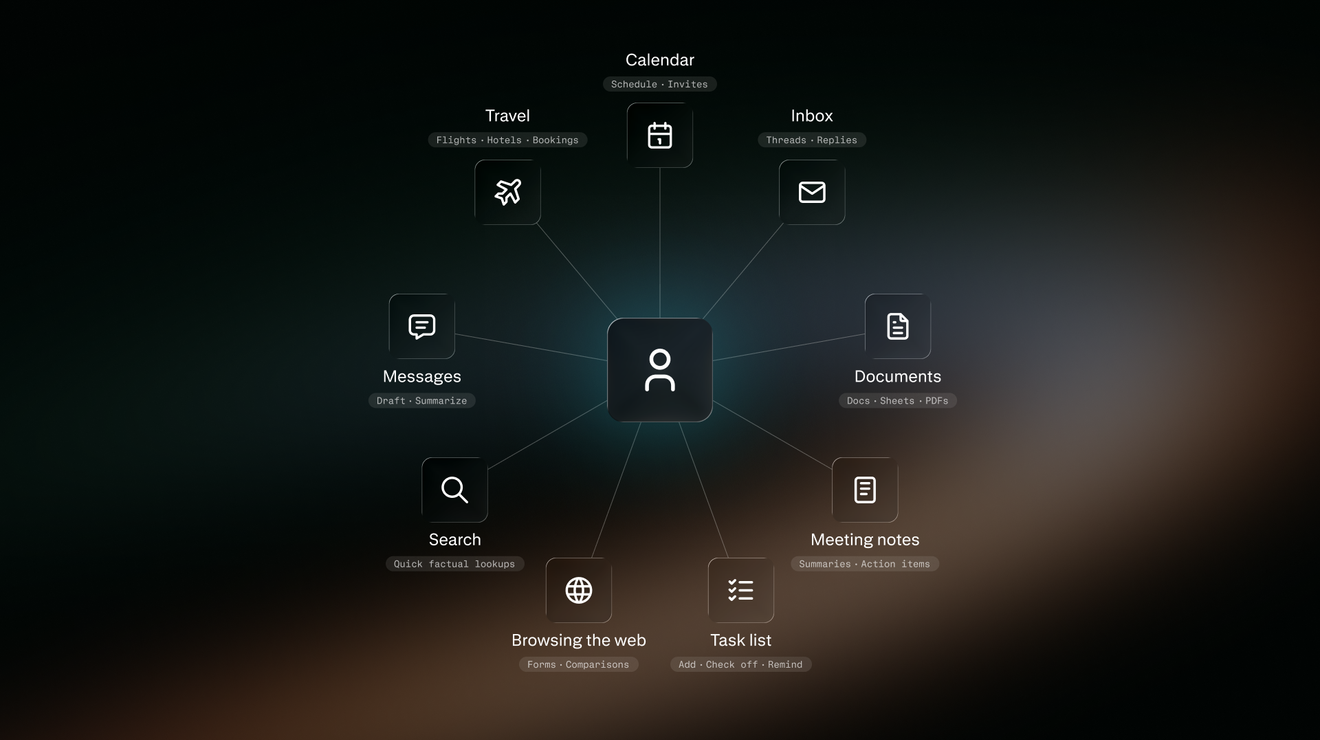
AI now does more than answer questions. A growing group of tools now function as AI personal assistants to help people streamline their daily work. People can delegate discrete tasks, such as preparing a report, organising a folder, filling out a form, prioritising emails, or managing a scheduling request.
AI personal assistants are becoming digital helpers that can do short work with focused projects. With some on-the-job training, and a good bit of common sense, they should be ready for a tryout.
What is an AI personal assistant?
An AI personal assistant is software that helps someone organise, coordinate, and complete day-to-day tasks. It uses natural-language instructions, automation, and authorised data and applications to handle administrative jobs like preparing for a meeting, sorting email, and finding a time to talk.
As with a human assistant, people ask an AI assistant to do something, and it gets it done. AI assistants can use software and websites, analyse spreadsheets, draft emails, manage calendars, and assemble information into a usable format on someone’s behalf. Some personal assistants help only when asked. Others can carry out a short series of approved steps.
AI chatbots, agents, and personal assistants
AI chatbots are built for conversation. People ask a question or give a prompt, and the tool responds. Siri and Alexa helped establish that familiar pattern.
A shift has been underway toward AI agents, advanced systems designed to handle specific tasks independently and increasingly autonomously. They use AI models to take multiple steps to solve complex problems in the real world, like resolving routine customer service queries, extracting and analysing data from multiple documents, or assisting developers with coding.
The boundaries between chatbots, agents, and personal assistants can be blurry and functions can overlap. Think of an AI personal assistant in terms of who it helps: one person managing the meetings, messages, documents, and tasks that make up a working day. An AI personal assistant may also use agents behind the scenes and take a conversational approach like a chatbot.
How do AI personal assistants work?
AI personal assistants can use apps, websites, and AI agents on a person’s behalf to get an individual’s routine work done. They can string together discrete tasks, such as sending messages, scheduling appointments, updating records, and communicating with other agents.
People give an assistant access to selected websites, documents, emails, and apps. The AI personal assistant works on a project while workers focus on other things. The assistant can gather information, prepare a draft, or carry out other approved work. For actions with major consequences, the assistant should stop and ask for human review before it sends, publishes, buys, deletes, or changes an important record.
Category | Way of Working | Memory | Autonomy | Examples |
AI chatbot | Answers questions and prompts through a conversation | Remembers the current conversation and sometimes preferences, interests, and earlier requests | Low to moderate | Explain a concept, summarise text, draft an email |
AI agent | Pursues a defined goal in several steps using available tools | May keep track of the task it is doing, earlier steps, and results so it does not lose its place | Moderate to high within guardrails | Reconcile records, resolve a routine support request, gather data across systems |
AI personal assistant | Supports one person’s work across tools and information | May retain preferences, projects, contacts, and earlier work when permitted | Low to high within permissions | Prepare daily briefings, triage email, coordinate meetings, track follow-up tasks |
What assistants can handle today
A lot of real-world uses fall into a few recurring categories:
- Research: Find information, prepare a report, solve structured problems. Tech journalist Joanna Stern used her AI assistants to synthesise and organise vast amounts of documents and help with fact-checking her book, I Am Not a Robot, about the year she spent integrating AI into nearly every aspect of her life. She did not, however, use AI to write.
- Email: Sort messages, label routine requests, and draft responses for review. Cybersecurity executive Huzeyfe Onal let his Fyxer assistant respond to emails that he read and sent. He also dictated email responses and let the assistant edit them into crisp responses, saving him hours each day.
- Note-taking: Turn meeting transcripts into summaries, action items, and searchable records of decisions. Note-taking assistants work as a searchable memory bank people can query to recall what colleagues discussed and agreed to.
- Calendars and to-dos: Prepare a view of the day, fix scheduling conflicts, and track action items. Amazon Web Services executive Andre Famula uses an AI operating system of nine agents named after athletes he admires. The team of agents prioritises the day’s calendar, assembling prep notes about promises made, to-do lists, and unread messages and emails, among other tasks.
- Shopping prep: One reporter at The Verge gave an agent assistant the task of searching for a lamp on Etsy and shopping for flowers.
Some AI personal assistants can help without requiring a new request, especially when a person has set clear rules and given permission. A daily briefing might flag an upcoming meeting, an unanswered message, or a deadline that is drawing near.
What AI assistants are best at
An AI assistant is a good fit for jobs that are specific and easy to check. A boss can inspect and correct an assistant’s work before it becomes an action, message, or final document.
But AI personal assistants aren’t always as sharp and dependable as a human assistant, and they can make mistakes. In the 2026 AI Index of Stanford’s Human-Centered Artificial Intelligence (HAI), leading agents completed about two-thirds of tasks on OSWorld, a benchmark of common computer-use tasks. They still failed roughly one out of three attempts in that test.
No assistant can yet manage every aspect of your life, like the sci-fi assistant JARVIS in Marvel’s Iron Man franchise. They work best on well-defined tasks in which a person can see what happened and step in when needed.
Choosing the right type of assistant
AI personal assistants generally come in three forms. The right choice depends on the work, the systems to be accessed, and the level of control required.
Type | Description | Best fit | Main trade-off | Examples |
Bundled assistant | Built into a device, productivity suite, or workplace platform | Work already concentrated in an ecosystem | Limited ability to work across platforms | Microsoft 365 Copilot in Outlook: “Prepare with Copilot” feature; Google Gemini in Gmail and Google Workspace; Apple Intelligence Writing Tools and Siri |
Dedicated assistant | A standalone tool built around an individual’s everyday apps and admin work, such as inbox management, task prioritisation, meeting prep, scheduling, and follow-ups | Individuals or teams with a defined workflow | Requires careful design of connections and permissions | Lindy; Fyxer; Saner.AI; Reclaim; Perplexity Comet Assistant |
Custom assistant | A personalised assistant that connects to the apps and information someone already uses | Repeated, high-value work with personalised requirements | Requires design, testing, maintenance, and governance | Assistant-building tools include n8n; Zapier; Make |
How to build an assistant
Building one’s own tool isn’t as easy as it may sound. At a conceptual level, DIY experts recommend a few architectural principles:
- Start with the least complex system that can complete the task. Many AI platforms distinguish predefined “workflows,” or a set of steps to get a job done, from agents that dynamically choose their process and tool use. Use a workflow for predictable steps, and add an agent only when the task requires judgement about what to do next.
- Give the assistant a clear role, the right information, and a way to report progress. A basic personal assistant might receive a request, check the relevant calendar or documents, draft a response, and ask for approval before acting.
- Define where information about user preferences gets stored. That also means deciding who can access it, how long it is retained, and how it can be corrected or deleted. Local storage can reduce dependence on one platform, but it does not automatically improve security, privacy, or governance.
- Keep a human in charge. Decide which things require immediate attention, which can wait for a daily summary, and which actions always need approval. A short, written guide to priorities, tone, and boundaries can make the assistant more useful over time.
To help streamline the creation of custom assistants, n8n features builder tutorials and templates to automate digital tasks across platforms, such as creating an email newsletter, handling emails, posting to social media, and retrieving information from local files.
Designing effective guardrails
Guardrails define what an assistant may access, what it is allowed to do, when it must request approval, and how people can review its actions. These controls matter most when an assistant can send messages, change records, make purchases, access sensitive information, or act across connected systems. A few simple rules make those limits easier to maintain:
- Limit permissions. A shift is happening from guarding against models saying the wrong thing to preventing models from doing the wrong thing, according to McKinsey’s State of AI Trust report. Give an assistant the smallest set of data and actions needed for its assigned task. It may need the ability to read calendars to prepare a briefing, for example, without permission to create meetings or send invitations. Avoid giving an assistant unrestricted access to passwords, financial accounts, or highly sensitive files.
- Require approval for consequential actions. A useful operating rule is AI drafts, humans decide. Require explicit review before an assistant sends external communications, publishes material, spends money, deletes information, changes important records, or makes decisions with legal, financial, medical, employment, or security consequences. Two examples of what can go wrong include an email-organising assistant that deleted thousands of messages and an assistant that irreparably damaged a file it had been asked to edit, The New York Times reported. The more serious or difficult-to-reverse the action, the more closely a person should review it.
- Treat external content as untrusted. Webpages, emails, documents, and attachments can contain instructions intended to manipulate an AI system. For example, connected agents can encounter malicious instructions hidden in webpages, emails, and attachments, which can launch an attack known as a prompt injection. Require approval for sensitive actions, limit tool access, and log actions so they can be reviewed.
What a personal assistant can safely do
Can act automatically | Can act after approval | Must remain human-led |
Summarise documents, label messages, create private drafts | Send emails, schedule external meetings, update records | Approve payments, sign contracts, make hiring decisions, change sensitive-data access |
The bottom line
AI personal assistants work best when they have a clear job, limited access to personal or sensitive information, and a person reviewing important decisions. They can take some of the tedium out of a workday, but the final responsibility remains human.
How Perplexity can help
Perplexity combines research with practical help: Comet Assistant can gather information from the web, email, and calendars to prepare for meetings and handle approved tasks from a browser, while Computer helps teams get complex, multi-step work done, and Scheduled Tasks in Computer takes care of recurring briefings and check-ins.
FAQs
When are AI personal assistants the most helpful?
They are most useful for routine work that has a clear purpose and a simple way to check the results. For example, AI personal assistants can help prepare for a meeting, organise an inbox, or turn notes into a short list of next steps.
How is an AI personal assistant different from a chatbot?
A chatbot mainly responds to questions and prompts. A personal assistant has a broader role: it can work across approved tools to pull together information or complete a sequence of steps tied to a person’s day-to-day work.
Can an AI personal assistant send emails or schedule meetings?
An assistant can help prepare an email, suggest meeting times, and put together a calendar invitation. People should still review messages and scheduling changes before they go out, particularly when they can have reputational, security, or financial consequences.
When should a person take over from an AI assistant?
People should step in when the work calls for judgement, nuance, or context the assistant does not reliably have. People should set priorities, handle unusual requests, resolve disagreements, and decide whether a draft or recommendation is appropriate.
What is a good first task for an AI personal assistant?
Start with something familiar and routine. Preparing a daily meeting brief, organising follow-ups, or drafting a routine email can offer a practical way to test the assistant’s usefulness before connecting additional systems or changing everything at once.