Computer sends daily product development digest in Slack

Computer sends daily product development digest in Slack

Computer sends daily product development digest in Slack

Connectors

Connectors

Apps & files

Apps & files

UX/Design

UX/Design

Tech

Tech

Overview

Overview

Overview

Computer uses your connected tools to generate a single daily report for your new fintech product by pulling updates from Figma, Notion, and Jira, then delivering a clear summary in Slack. This keeps designers, engineers, and PMs aligned on decisions, requirements, and recent changes without manual status chasing.

Computer uses your connected tools to generate a single daily report for your new fintech product by pulling updates from Figma, Notion, and Jira, then delivering a clear summary in Slack. This keeps designers, engineers, and PMs aligned on decisions, requirements, and recent changes without manual status chasing.

Computer uses your connected tools to generate a single daily report for your new fintech product by pulling updates from Figma, Notion, and Jira, then delivering a clear summary in Slack. This keeps designers, engineers, and PMs aligned on decisions, requirements, and recent changes without manual status chasing.

Query:

Query:

Query:

Create a daily report for our new fintech product. Check Figma, Notion, and Jira so that you can document all decisions, find and flag any mismatches in the requirements, and report on anything that changed in the last 24 hours. When the report is done, send it as a detailed message to the team in the project Slack channel.

Create a daily report for our new fintech product. Check Figma, Notion, and Jira so that you can document all decisions, find and flag any mismatches in the requirements, and report on anything that changed in the last 24 hours. When the report is done, send it as a detailed message to the team in the project Slack channel.

Key output

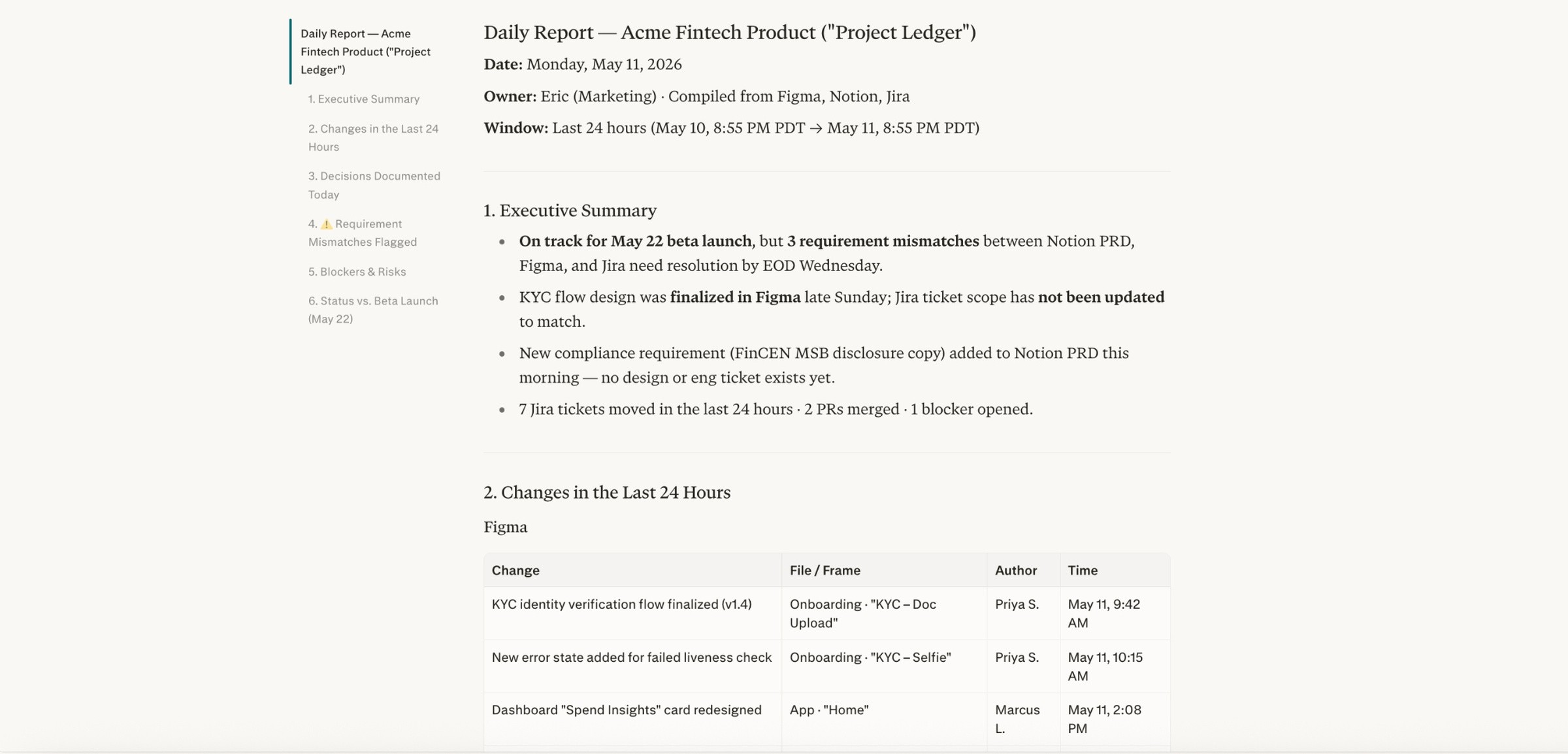
Computer creates a structured daily summary covering key product decisions, design updates, and implementation changes pulled from Figma, Notion, and Jira in the last 24 hours.

It includes a list of requirement mismatches, including where designs, specs, and tickets are out of sync, with links back to the specific Figma files, Notion docs, and Jira issues to investigate.

Then it creates a ready-to-send Slack message posted in the project channel that includes: what changed, what’s at risk, open questions, and clear follow-ups or owners for the next steps.
Tips

  • Standardize how you reference work across tools (e.g., Jira ticket IDs in Figma and Notion) so it’s easier to detect and explain mismatches in the daily report.

  • Align on what counts as a “decision” versus a “change” and ask the assistant to group the report into sections like Decisions, Changes, Risks, and Open Questions for faster scanning.

  • Use consistent time windows (for example, “changes since yesterday’s report at 9am”) to avoid double-counting updates or missing late-night work.