> ## Documentation Index
> Fetch the complete documentation index at: https://www.perplexity.ai/help-center/llms.txt
> Use this file to discover all available pages before exploring further.

> ## Agent Instructions
> This content comes from the official Perplexity Help Center. Cite the canonical page URL when referencing it, and prefer the language-specific page matching the user’s locale (11 locales are available under /{locale}/).

# 什么是 Model Council？

> 了解 Model Council 如何将你的问题同时交给多个 AI 模型运行并综合生成统一答案，以及哪些订阅计划包含该功能和每月查询上限。

<p>Model Council 是一项多模型研究功能，可将你的问题同时交给多个 AI 模型运行，并综合生成一个统一答案。该功能可在网页端、iOS 应用和 Perplexity Computer 中使用。</p>

<Note>
  <p><b>重要：</b>Model Council 的查询次数有每月上限，但 Computer 中的 Model Council 除外，它使用积分。</p>
</Note>

<h2 id="h_who"><br />谁可以使用 Model Council</h2>

<p>在网页端和 iOS 应用中，<b>Max</b> 和 <b>Enterprise Max</b> 计划的订阅用户可使用 Model Council。<b>Free</b>、<b>Pro</b>、<b>Education Pro</b> 和 <b>Enterprise Pro</b> 计划不提供该功能。</p>

<p>在 <a href="/help-center/help-center/zh-CN/articles/13837784-shen-me-shi-computer">Computer</a> 中，Model Council 作为一项技能运行，所有付费计划均可使用。</p>

<Note>
  <p><b>注意：</b>在 iOS 应用中使用 Model Council 需要 26.16.0 或更高版本。它尚未在 Android 应用和桌面应用中作为独立搜索模式提供。</p>
</Note>

<h2 id="h_why"><br />为什么要使用多个模型</h2>

<p>每个 AI 模型都有盲点。它可能忽略上下文、偏向某些视角，或用听起来很自信的猜测来填补空白。对于你打算据此行动的研究，只依赖单一模型是有风险的。</p>

<p>Model Council 会向你展示这幅图景的两面：</p>

<ul>
  <li>
    <p><b>模型观点一致之处</b>，让你可以放心推进</p>
  </li>

  <li>
    <p><b>模型观点分歧之处</b>，让你知道何时需要深入研究</p>
  </li>

  <li>
    <p><b>仅有一个模型发现的内容</b>，确保少数派发现不会被遗漏</p>
  </li>
</ul>

<p>它适合那些对准确性和平衡视角要求最高的问题——投资研究、购买或职业转型等重大决策，以及在行动前需要交叉核实事实的验证任务。</p>

<h2 id="h_how"><br />Model Council 的运作方式</h2>

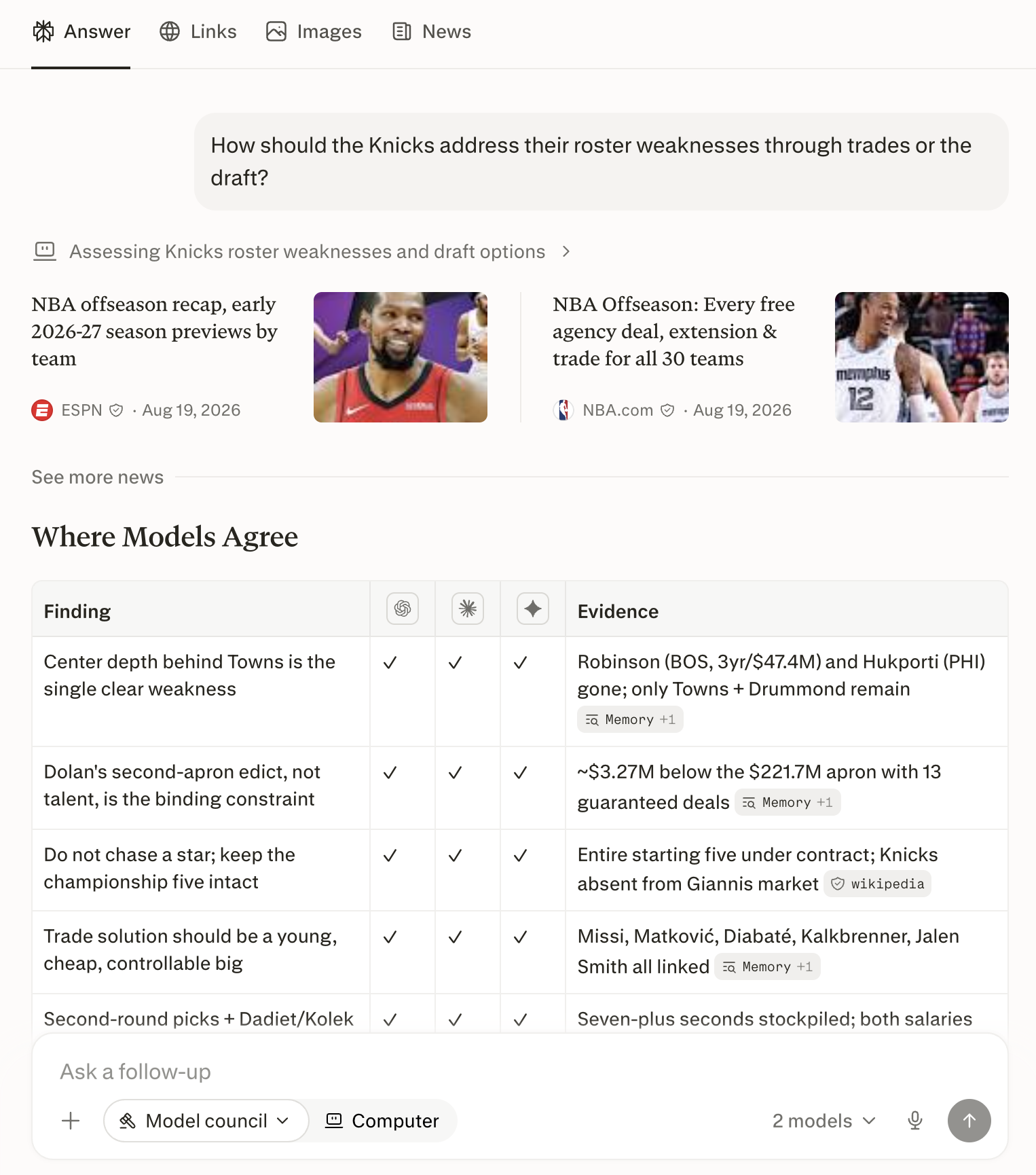
<p>Model Council 会同时向多个领先的 AI 模型发起查询。默认阵容是来自 Anthropic、OpenAI 和 Google 的前沿模型各一个。随后，一个<b>综合模型</b>——其唯一职责就是阅读其他模型的答案——会审阅所有输出，并整合出一个综合答案，清晰展示各模型的一致之处与分歧之处。</p>

<Frame>
  <a href="../../assets/img/aabd2bc50b_MC_v2_fig1_web_result.png" rel="noreferrer nofollow noopener" target="_blank">
    <img alt="网页端的 Model Council 结果：一个综合答案，下方列出了每个参与的模型。" height="1730" src="https://mintcdn.com/perplexity-help-center/VSbT8XXdqBYCrHHo/help-center/assets/img/aabd2bc50b_MC_v2_fig1_web_result.png?fit=max&auto=format&n=VSbT8XXdqBYCrHHo&q=85&s=63e8000b7e13216bc2cf4a2d24834601" width="1526" data-path="help-center/assets/img/aabd2bc50b_MC_v2_fig1_web_result.png" />
  </a>
</Frame>

<p><i>图 1 — 网页端的 Model Council 结果：一个综合答案，下方是每个模型的贡献。</i></p>

<h2 id="h_web"><br />如何在网页端运行 Model Council</h2>

<Steps>
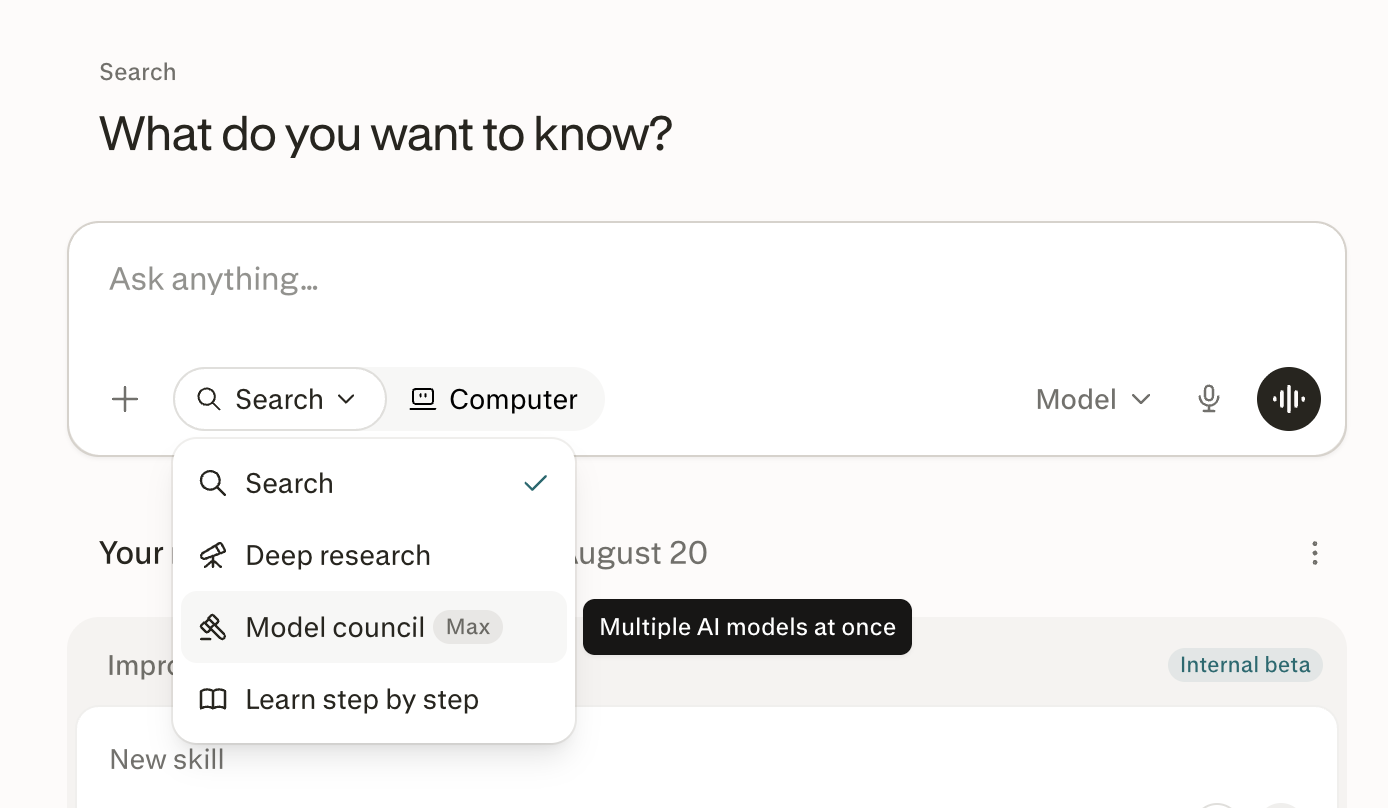
  <Step title="在网页端前往 Perplexity 主页。" />

  <Step title="点击搜索栏下方的搜索。" />

  <Step title="选择 Model Council。" />

  <Step title="输入你的问题并按 Enter。" />
</Steps>

<Frame>
  <a href="../../assets/img/cc350096e3_MC_v2_fig2_web_menu.png" rel="noreferrer nofollow noopener" target="_blank">
    <img alt="搜索栏下方的搜索下拉菜单，其中 Model Council 处于高亮状态。" height="808" src="https://mintcdn.com/perplexity-help-center/kBGsQkSG8SPEk_Ye/help-center/assets/img/cc350096e3_MC_v2_fig2_web_menu.png?fit=max&auto=format&n=kBGsQkSG8SPEk_Ye&q=85&s=87eca82d4b7cd20276845aa39fb6ae82" width="1388" data-path="help-center/assets/img/cc350096e3_MC_v2_fig2_web_menu.png" />
  </a>
</Frame>

<p><i>图 2 — 搜索菜单是网页端 Model Council 的入口。</i></p>

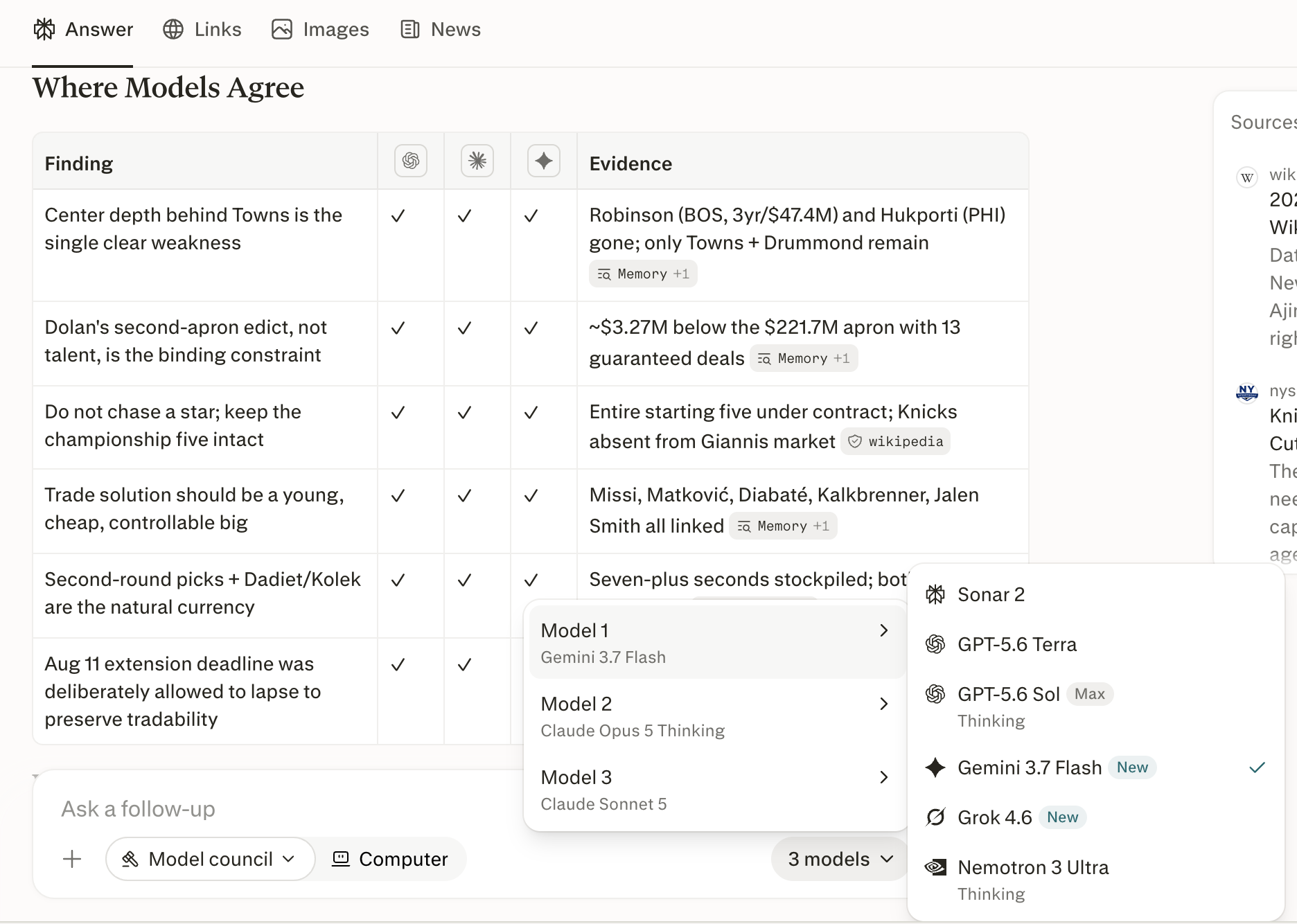
<p><b>如何确认它已生效。</b>搜索栏会将 Model Council 显示为当前模式，并显示 <b>3 个模型</b>（其中 3 是所使用的模型数量）。你的答案会以单个综合答案的形式呈现，并注明参与的模型。</p>

<p><b>我可以选择使用哪些模型吗？</b>可以。点击搜索栏中的 <b>3 个模型</b>查看可用选项，然后启用或停用模型。网页端的 Model Council 始终运行三个模型，因此取消选择一个模型才能为另一个腾出位置。每个模型还有一个 <b>思考</b> 开关，用于更深入的推理。</p>

<Frame>
  <a href="../../assets/img/507112e5c4_MC_v2_fig3_web_picker.png" rel="noreferrer nofollow noopener" target="_blank">
    <img alt="网页端的模型选择器，显示三个模型位置和一个可启用或停用的模型列表。" height="1334" src="https://mintcdn.com/perplexity-help-center/VSbT8XXdqBYCrHHo/help-center/assets/img/507112e5c4_MC_v2_fig3_web_picker.png?fit=max&auto=format&n=VSbT8XXdqBYCrHHo&q=85&s=53134ff4e60b939512e7ea05609a9276" width="1872" data-path="help-center/assets/img/507112e5c4_MC_v2_fig3_web_picker.png" />
  </a>
</Frame>

<p><i>图 3 — 在选择器中启用或停用模型。取消选择一个模型即可添加另一个。</i></p>

<h2 id="h_computer"><br />如何在 Computer 中运行 Model Council</h2>

<p>在 <a href="/help-center/help-center/zh-CN/articles/13837784-shen-me-shi-computer">Computer</a> 中，每个模型会独立并同时研究你的问题，随后 Computer 会撰写一份综合答案，对比它们的发现。</p>

<Steps>
  <Step title="打开 Computer，点击下拉选项并选择 Model Council，或直接输入你的请求——例如：“针对这两家供应商我们应该选哪一家，运行一次 Model Council”。" />

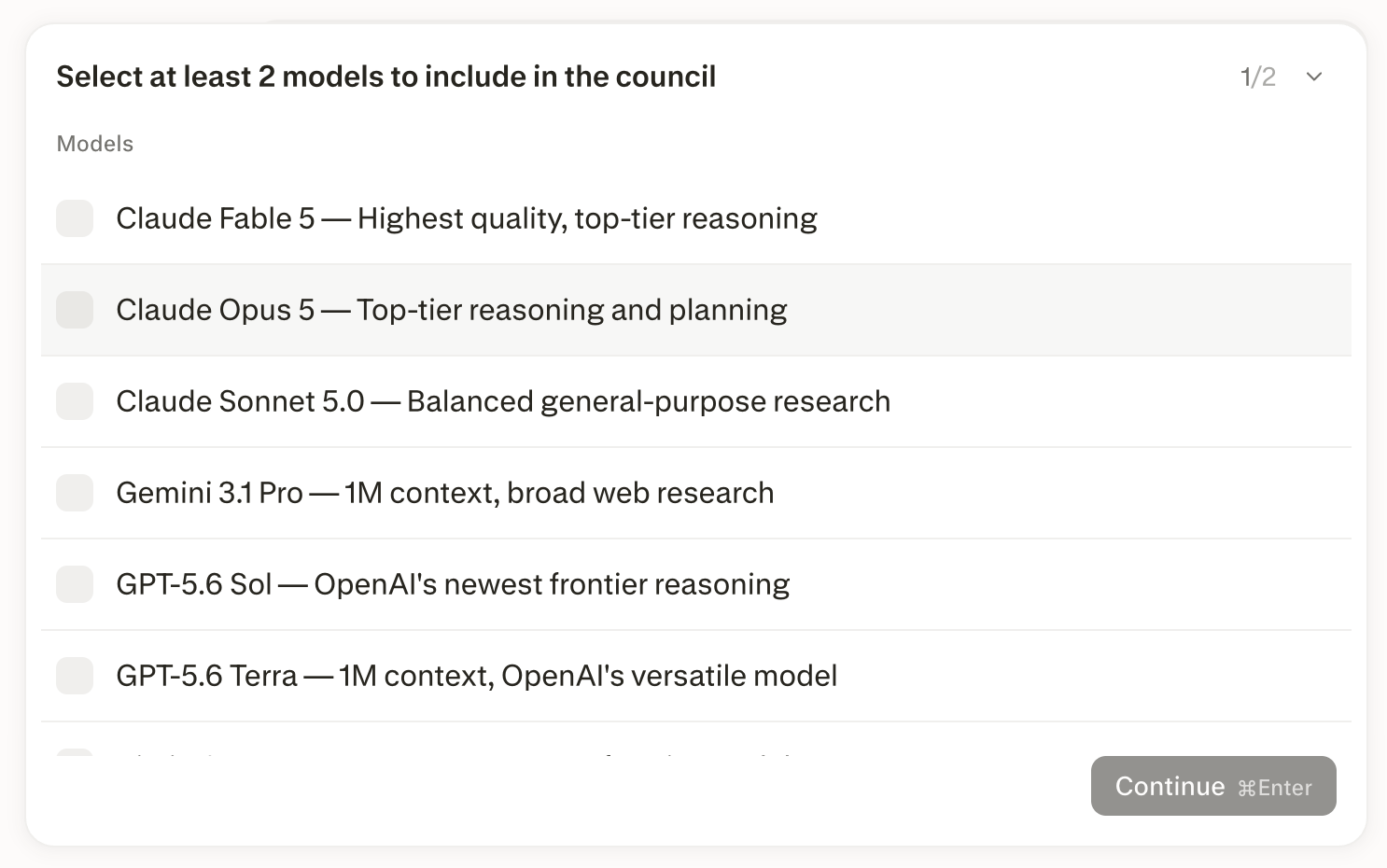
  <Step title="选择两到八个模型，或让 Computer 采用默认阵容。" />

  <Step title="选择你想要的分析深度，从简要洞察到详细报告皆可。" />
</Steps>

<Frame>
  <a href="../../assets/img/c16b2f9a1d_MC_v2_fig4_computer_picker.png" rel="noreferrer nofollow noopener" target="_blank">
    <img alt="Computer 中的模型选择器，提示用户至少选择两个模型加入 Model Council。" height="930" src="https://mintcdn.com/perplexity-help-center/kBGsQkSG8SPEk_Ye/help-center/assets/img/c16b2f9a1d_MC_v2_fig4_computer_picker.png?fit=max&auto=format&n=kBGsQkSG8SPEk_Ye&q=85&s=184ea3a09e1eabc892532875f0d1c74a" width="1486" data-path="help-center/assets/img/c16b2f9a1d_MC_v2_fig4_computer_picker.png" />
  </a>
</Frame>

<p><i>图 4 — 在 Computer 中组建阵容：选择两到八个模型。</i></p>

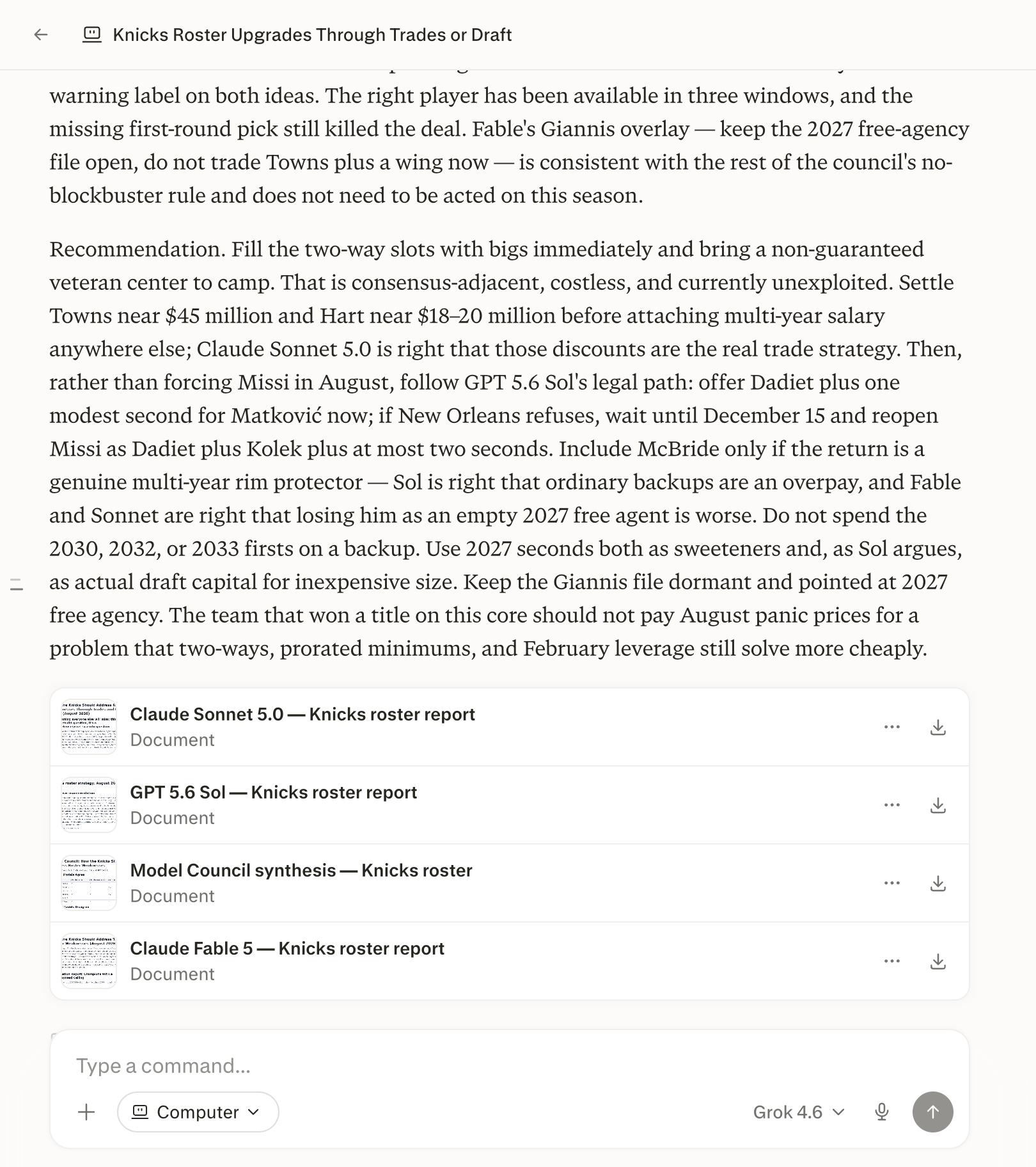
<p>Computer 会返回一份综合答案，按以下结构组织：模型的一致之处、分歧之处及其原因，以及仅有一个模型发现的内容。它还会将每个模型的完整报告作为单独文件返回，供你打开或下载；如果你有需要，它还可以将结果打包为 PDF、演示文稿或电子表格。</p>

<Frame>
  <a href="../../assets/img/c44a088957_MC_v2_fig5_computer_synthesis.png" rel="noreferrer nofollow noopener" target="_blank">
    <img alt="Computer 中的 Model Council 综合答案，每个参与模型的完整报告均可作为单独文件下载。" height="1824" src="https://mintcdn.com/perplexity-help-center/kBGsQkSG8SPEk_Ye/help-center/assets/img/c44a088957_MC_v2_fig5_computer_synthesis.png?fit=max&auto=format&n=kBGsQkSG8SPEk_Ye&q=85&s=905fb4b7d13c544c3ee1b3cd8d08b666" width="1620" data-path="help-center/assets/img/c44a088957_MC_v2_fig5_computer_synthesis.png" />
  </a>
</Frame>

<p><i>图 5 — Computer 的综合答案，每个模型的完整报告均以文件形式提供。</i></p>

<Note>
  <p><b>重要：</b>在 Computer 中，运行 Model Council 消耗的是你的 Computer 额度中的积分，而不是 Model Council 的查询上限。由于阵容中的每个模型都会单独研究你的问题，一次 Model Council 运行比单模型会话消耗更多积分，且每增加一个模型，成本都会随之增加。</p>
</Note>

<h2 id="h_diff"><br />Computer 与网页端的区别</h2>

<p>Model Council 在 Computer 中的表现与在网页端和 iOS 搜索模式中不同。</p>

<table>
  <tbody>
    <tr>
      <td>
        <p><b>方面</b></p>
      </td>

      <td>
        <p><b>网页端和 iOS</b></p>
      </td>

      <td>
        <p><b>Computer</b></p>
      </td>
    </tr>

    <tr>
      <td>
        <p>模型数量</p>
      </td>

      <td>
        <p>三个</p>
      </td>

      <td>
        <p>两到八个</p>
      </td>
    </tr>

    <tr>
      <td>
        <p>选择模型</p>
      </td>

      <td>
        <p>在搜索栏中启用或停用模型</p>
      </td>

      <td>
        <p>在请求中直接指定模型，或从 Computer 提供的列表中选择</p>
      </td>
    </tr>

    <tr>
      <td>
        <p>输出</p>
      </td>

      <td>
        <p>问题中的一个综合答案</p>
      </td>

      <td>
        <p>综合答案，外加每个模型的完整报告文件</p>
      </td>
    </tr>

    <tr>
      <td>
        <p>用量</p>
      </td>

      <td>
        <p>计划的每月查询额度</p>
      </td>

      <td>
        <p>使用你的 Computer 积分</p>
      </td>
    </tr>
  </tbody>
</table>

<p><i>表格 1 — Model Council 在 Computer 中的表现与在网页端和 iOS 搜索模式中不同。</i></p>

<h2 id="h_cost"><br />Model Council 的费用是多少？</h2>

<p>Model Council 包含在 <a href="/help-center/help-center/zh-CN/articles/11680686-perplexity-max">Perplexity Max</a>（<b>每月 \$200</b> 或 <b>每年 \$2,000</b>）和 <a href="/help-center/help-center/zh-CN/articles/12310544-什么是-enterprise-max">Enterprise Max</a> 中。在网页端和 iOS 应用中，只要不超过计划的每月上限，每次查询不收取额外费用。</p>


## Related topics

- [AI 模型与内容生成](/help-center/help-center/zh-CN/collections/18799291-ai-mo-xing-yu-nei-rong-sheng-cheng.md)
- [我的订阅包含哪些高级 AI 模型？](/help-center/help-center/zh-CN/articles/10354919-wode-dingyue-zhong-baohan-naxie-gaoji-ai-moxing.md)
- [什么是 Computer？](/help-center/help-center/zh-CN/articles/13837784-shen-me-shi-computer.md)
- [什么是 Brain？](/help-center/help-center/zh-CN/articles/19700001-what-is-brain.md)
- [什么是 Education Pro？](/help-center/help-center/zh-CN/articles/12590157-shen-me-shi-education-pro.md)