> ## Documentation Index
> Fetch the complete documentation index at: https://www.perplexity.ai/help-center/llms.txt
> Use this file to discover all available pages before exploring further.

> ## Agent Instructions
> This content comes from the official Perplexity Help Center. Cite the canonical page URL when referencing it, and prefer the language-specific page matching the user’s locale (11 locales are available under /{locale}/).

# Model Council이란 무엇인가요?

> Model Council이 여러 AI 모델에서 질문을 동시에 실행하고 하나의 통합 답변으로 합성하는 방식과 사용 가능한 요금제, 월간 한도를 알아보세요.

<p>Model Council은 하나의 질문을 여러 AI 모델에서 동시에 실행하고 하나의 통합된 답변으로 합성하는 멀티 모델 리서치 기능으로, 웹, iOS 앱, Perplexity Computer에서 사용할 수 있습니다.</p>

<Note>
  <p><b>중요:</b> Model Council 쿼리 실행 횟수에는 월간 한도가 있습니다. 단, Computer의 Model Council은 예외로 크레딧을 사용합니다.</p>
</Note>

<h2 id="h_who"><br />Model Council을 사용할 수 있는 대상</h2>

<p>웹과 iOS 앱에서 Model Council은 <b>Max</b> 및 <b>Enterprise Max</b> 플랜 구독자에게 포함되어 있습니다. <b>Free</b>, <b>Pro</b>, <b>Education Pro</b>, <b>Enterprise Pro</b> 플랜에서는 사용할 수 없습니다.</p>

<p><a href="/help-center/help-center/ko/articles/13837784-what-is-computer">Computer</a>에서는 Model Council이 스킬로 실행되며 모든 유료 플랜에서 사용할 수 있습니다.</p>

<Note>
  <p><b>참고:</b> iOS 앱에서 Model Council을 사용하려면 버전 26.16.0 이상이 필요합니다. Android 앱과 데스크톱 앱에서는 아직 독립적인 검색 모드로 제공되지 않습니다.</p>
</Note>

<h2 id="h_why"><br />여러 모델을 사용하는 이유</h2>

<p>모든 AI 모델에는 맹점이 있습니다. 맥락을 놓치거나, 특정 관점에 치우치거나, 부족한 부분을 자신감 있는 추측으로 채울 수 있습니다. 실행에 옮길 리서치라면 단일 모델에만 의존하는 것은 위험합니다.</p>

<p>Model Council은 그 그림의 양면을 모두 보여줍니다:</p>

<ul>
  <li>
    <p><b>모델들이 일치하는 지점</b> — 자신 있게 다음 단계로 나아갈 수 있습니다</p>
  </li>

  <li>
    <p><b>모델들이 엇갈리는 지점</b> — 언제 더 깊이 파고들어야 하는지 알 수 있습니다</p>
  </li>

  <li>
    <p><b>한 모델만 발견한 내용</b> — 소수 의견의 발견도 놓치지 않습니다</p>
  </li>
</ul>

<p>정확성과 균형 잡힌 시각이 가장 중요한 질문에 적합합니다. 예를 들어 투자 리서치, 구매나 커리어 전환 같은 중대한 의사결정, 그리고 행동에 옮기기 전에 사실을 교차 확인해야 하는 검증 작업 등이 있습니다.</p>

<h2 id="h_how"><br />Model Council의 작동 방식</h2>

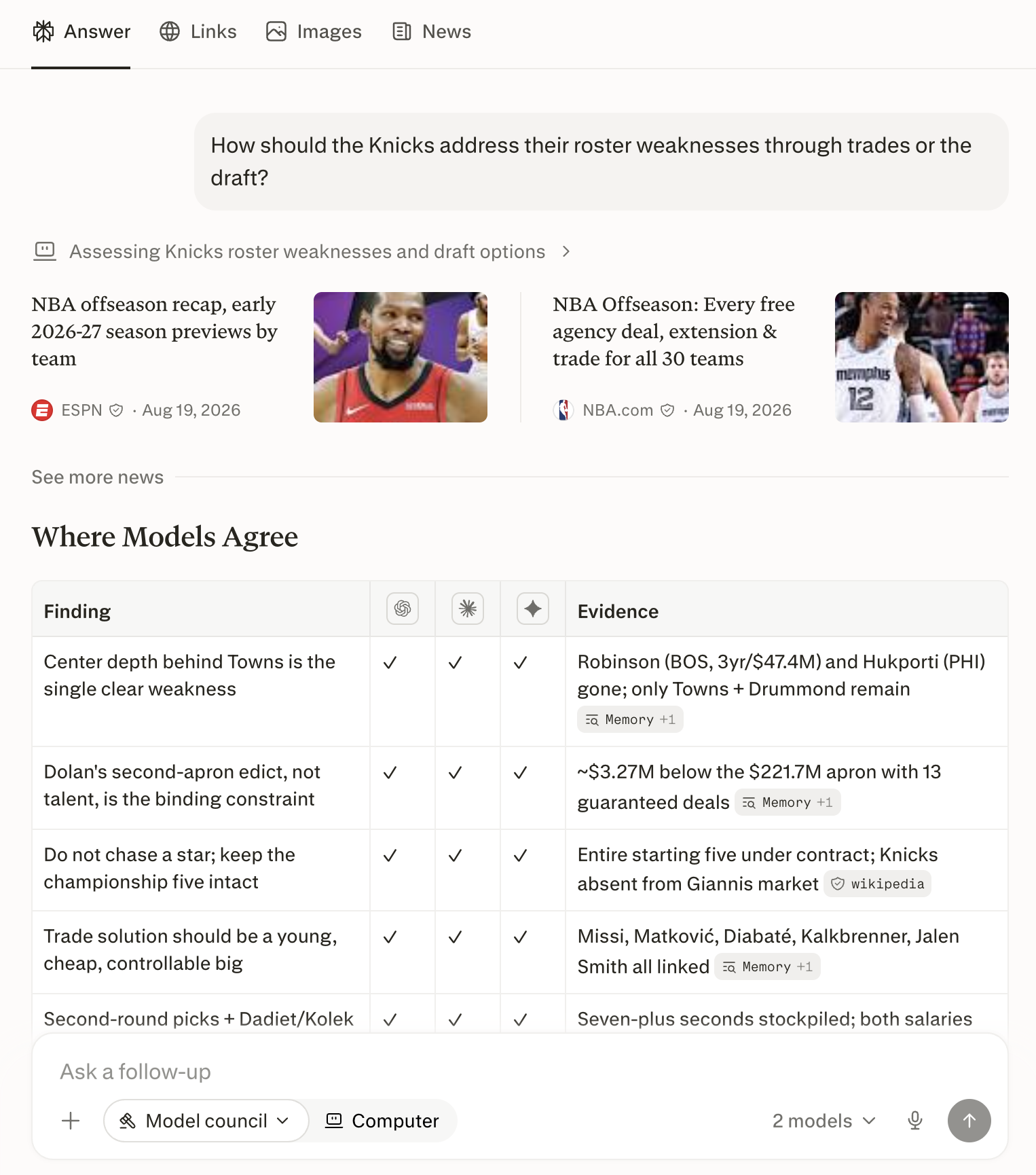
<p>Model Council은 여러 주요 AI 모델에 동시에 쿼리를 보냅니다. 기본 구성은 Anthropic, OpenAI, Google에서 각각 하나씩 선정한 프런티어 모델입니다. 그런 다음 <b>합성 모델</b> — 다른 답변을 읽는 것이 유일한 역할인 모델 — 이 모든 출력을 검토하고, 모델들이 일치하는 지점과 다른 지점을 보여주는 하나의 통합 답변을 도출합니다.</p>

<Frame>
  <a href="../../assets/img/aabd2bc50b_MC_v2_fig1_web_result.png" rel="noreferrer nofollow noopener" target="_blank">
    <img alt="웹의 Model Council 결과: 하나의 합성된 답변과 그 아래에 나열된 각 참여 모델." height="1730" src="https://mintcdn.com/perplexity-help-center/VSbT8XXdqBYCrHHo/help-center/assets/img/aabd2bc50b_MC_v2_fig1_web_result.png?fit=max&auto=format&n=VSbT8XXdqBYCrHHo&q=85&s=63e8000b7e13216bc2cf4a2d24834601" width="1526" data-path="help-center/assets/img/aabd2bc50b_MC_v2_fig1_web_result.png" />
  </a>
</Frame>

<p><i>그림 1 — 웹의 Model Council 결과: 하나의 합성된 답변과 그 아래 각 모델의 기여 내용.</i></p>

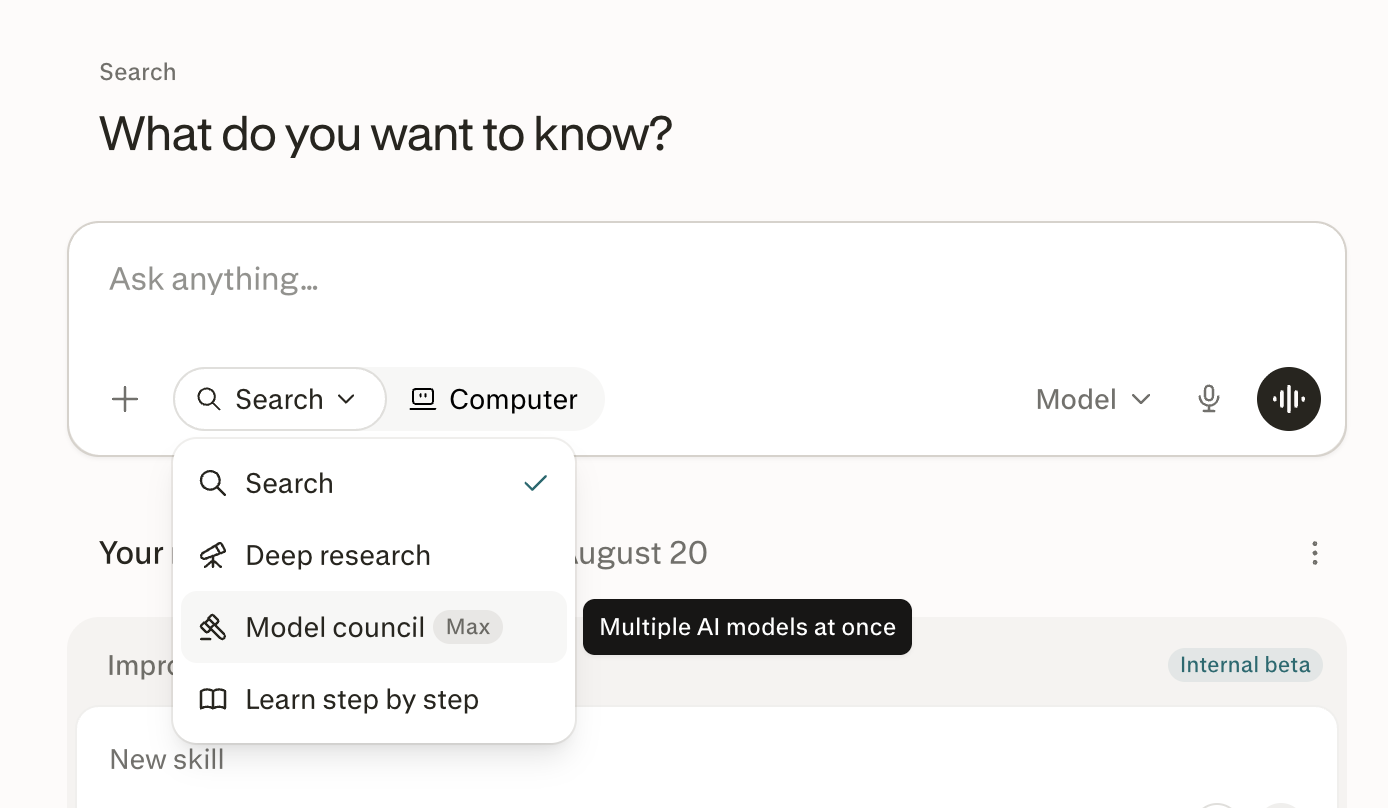
<h2 id="h_web"><br />웹에서 Model Council 실행하기</h2>

<Steps>
  <Step title="웹에서 Perplexity 홈페이지로 이동합니다." />

  <Step title="검색창 아래의 검색을 클릭합니다." />

  <Step title="Model Council을 선택합니다." />

  <Step title="질문을 입력하고 Enter를 누릅니다." />
</Steps>

<Frame>
  <a href="../../assets/img/cc350096e3_MC_v2_fig2_web_menu.png" rel="noreferrer nofollow noopener" target="_blank">
    <img alt="검색창 아래의 검색 드롭다운에서 Model Council이 강조 표시된 모습." height="808" src="https://mintcdn.com/perplexity-help-center/kBGsQkSG8SPEk_Ye/help-center/assets/img/cc350096e3_MC_v2_fig2_web_menu.png?fit=max&auto=format&n=kBGsQkSG8SPEk_Ye&q=85&s=87eca82d4b7cd20276845aa39fb6ae82" width="1388" data-path="help-center/assets/img/cc350096e3_MC_v2_fig2_web_menu.png" />
  </a>
</Frame>

<p><i>그림 2 — 웹에서 Model Council의 진입점은 검색 메뉴입니다.</i></p>

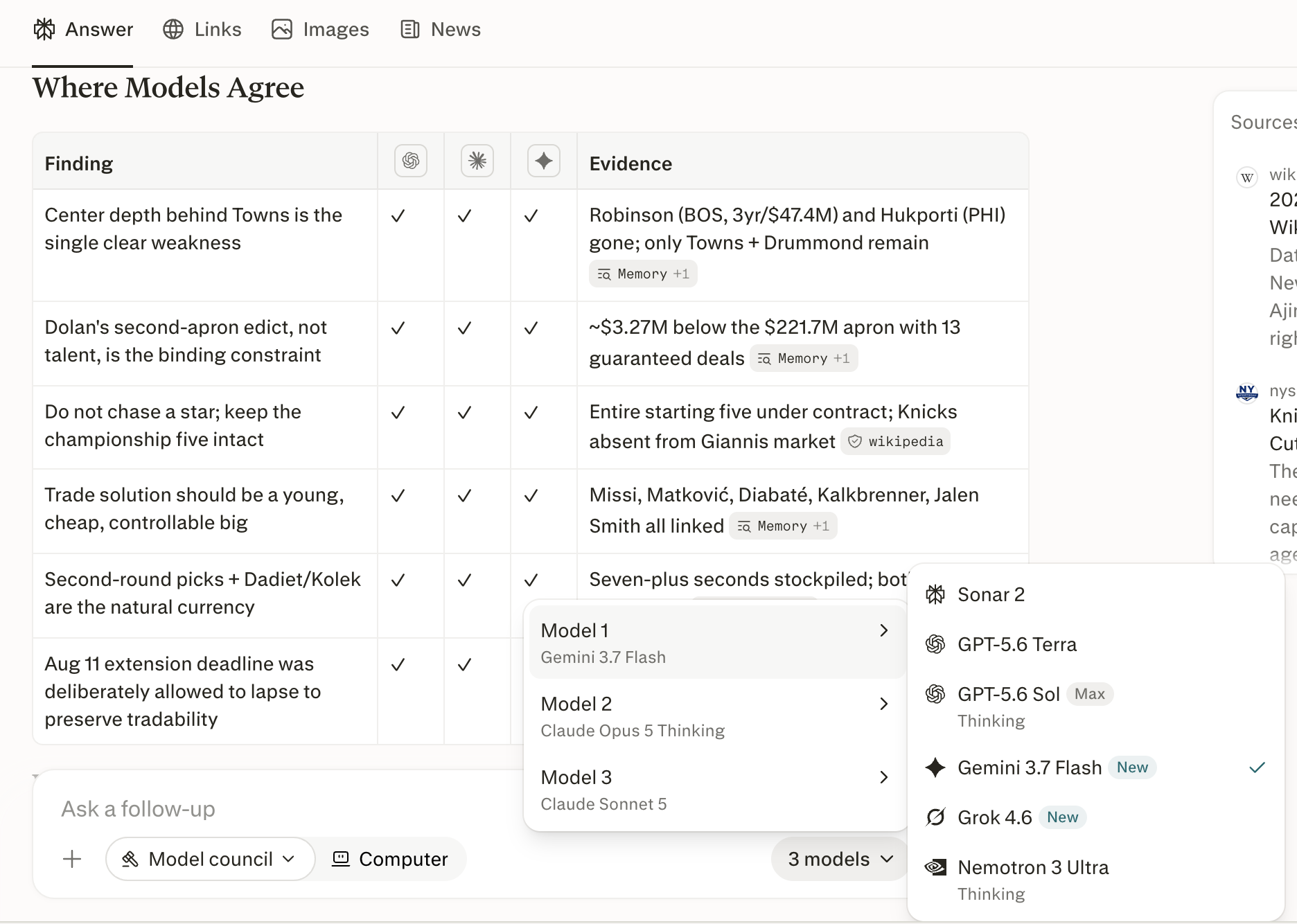
<p><b>제대로 실행되었는지 확인하는 방법.</b> 검색창에 Model Council이 활성 모드로 표시되고 <b>3개의 모델</b>(여기서 3은 사용된 모델 수)이 표시됩니다. 답변은 참여 모델의 이름이 명시된 하나의 합성 답변으로 도착합니다.</p>

<p><b>사용할 모델을 선택할 수 있나요?</b> 네. 검색창에서 <b>3개의 모델</b>을 클릭해 사용 가능한 옵션을 확인한 다음, 모델을 켜거나 끄세요. 웹에서 Model Council은 항상 세 개의 모델로 실행되므로, 다른 모델을 추가하려면 하나를 선택 해제해야 합니다. 각 모델에는 더 깊은 추론을 위한 <b>사고</b> 토글도 있습니다.</p>

<Frame>
  <a href="../../assets/img/507112e5c4_MC_v2_fig3_web_picker.png" rel="noreferrer nofollow noopener" target="_blank">
    <img alt="웹의 모델 선택기. 세 개의 모델 슬롯과 켜거나 끌 수 있는 모델 목록이 표시된 모습." height="1334" src="https://mintcdn.com/perplexity-help-center/VSbT8XXdqBYCrHHo/help-center/assets/img/507112e5c4_MC_v2_fig3_web_picker.png?fit=max&auto=format&n=VSbT8XXdqBYCrHHo&q=85&s=53134ff4e60b939512e7ea05609a9276" width="1872" data-path="help-center/assets/img/507112e5c4_MC_v2_fig3_web_picker.png" />
  </a>
</Frame>

<p><i>그림 3 — 선택기에서 모델을 켜거나 끄세요. 다른 모델을 추가하려면 하나를 선택 해제하세요.</i></p>

<h2 id="h_computer"><br />Computer에서 Model Council 실행하기</h2>

<p><a href="/help-center/help-center/ko/articles/13837784-what-is-computer">Computer</a>에서는 각 모델이 독립적으로 동시에 질문을 리서치한 다음, Computer가 각 모델의 결과를 비교하는 하나의 합성 답변을 작성합니다.</p>

<Steps>
  <Step title="Computer를 열고 드롭다운 옵션을 클릭해 Model Council을 선택하거나, 요청을 직접 입력하세요 — 예: &#x22;이 두 공급업체 중 어느 쪽을 선택해야 할지 Model Council을 실행해 줘&#x22;." />

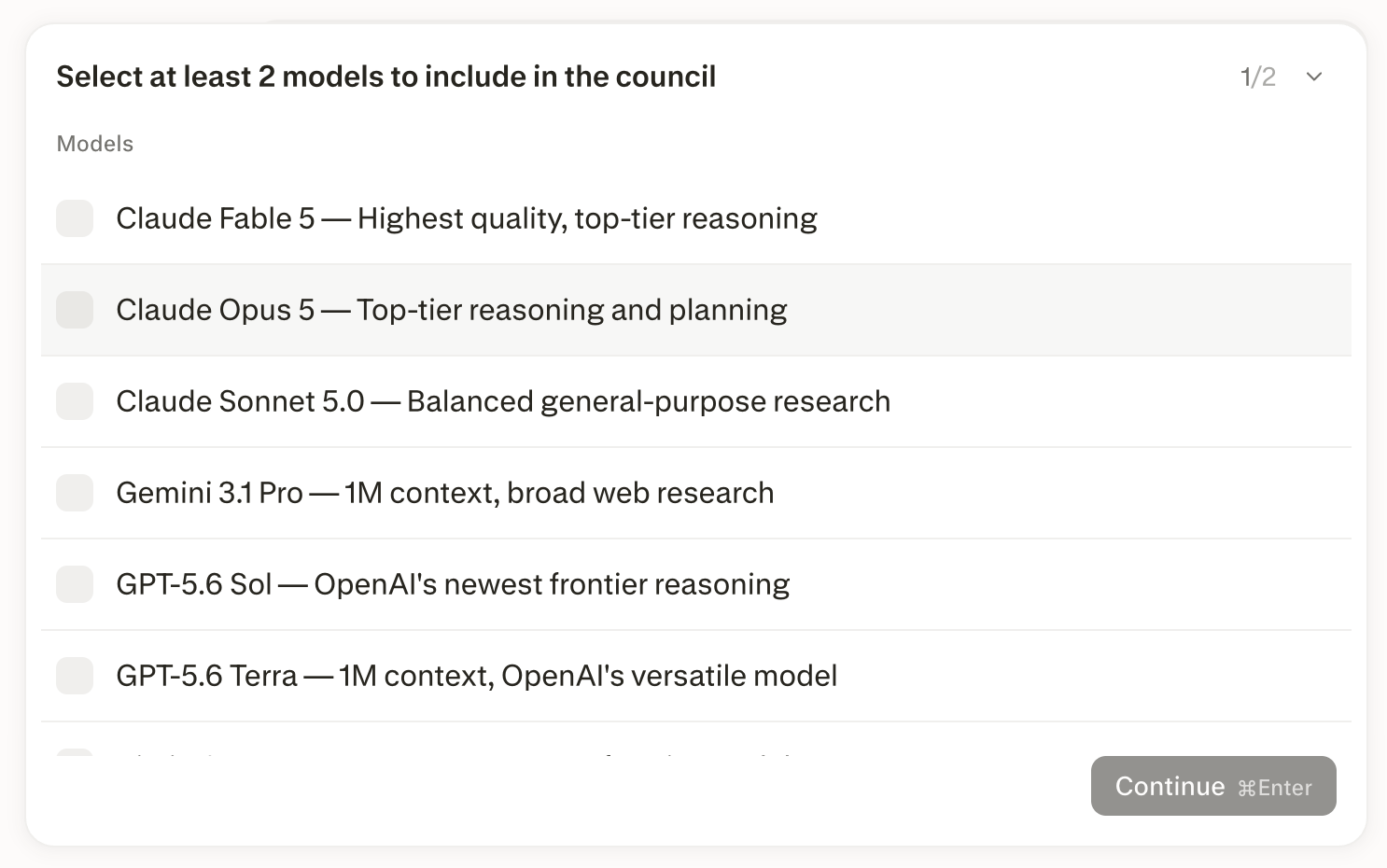
  <Step title="두 개에서 여덟 개 사이의 모델을 선택하거나, Computer가 기본 구성을 고르도록 맡기세요." />

  <Step title="간단한 인사이트부터 상세 보고서까지, 원하는 분석 깊이를 선택하세요." />
</Steps>

<Frame>
  <a href="../../assets/img/c16b2f9a1d_MC_v2_fig4_computer_picker.png" rel="noreferrer nofollow noopener" target="_blank">
    <img alt="Computer의 모델 선택기. Model Council에 포함할 모델을 최소 두 개 선택하라고 안내하는 모습." height="930" src="https://mintcdn.com/perplexity-help-center/kBGsQkSG8SPEk_Ye/help-center/assets/img/c16b2f9a1d_MC_v2_fig4_computer_picker.png?fit=max&auto=format&n=kBGsQkSG8SPEk_Ye&q=85&s=184ea3a09e1eabc892532875f0d1c74a" width="1486" data-path="help-center/assets/img/c16b2f9a1d_MC_v2_fig4_computer_picker.png" />
  </a>
</Frame>

<p><i>그림 4 — Computer에서 council 구성하기: 두 개에서 여덟 개 사이의 모델을 선택하세요.</i></p>

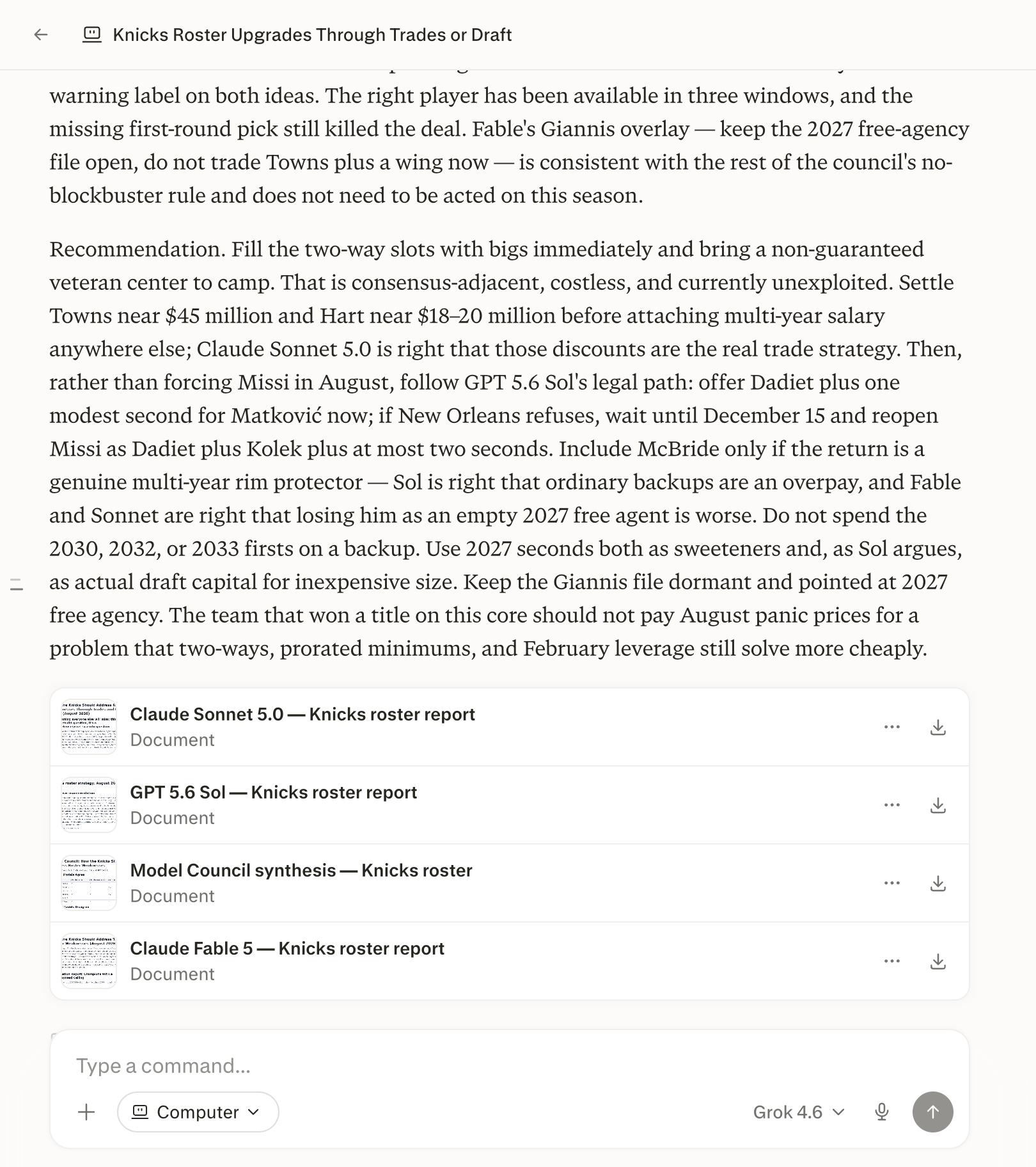
<p>Computer는 모델들이 일치하는 지점, 엇갈리는 지점과 그 이유, 그리고 한 모델만 발견한 내용으로 정리된 하나의 합성 답변을 반환합니다. 또한 각 모델의 전체 보고서를 열거나 다운로드할 수 있는 별도의 파일로 제공하며, 요청하면 결과를 PDF, 슬라이드 덱 또는 스프레드시트로 패키징할 수 있습니다.</p>

<Frame>
  <a href="../../assets/img/c44a088957_MC_v2_fig5_computer_synthesis.png" rel="noreferrer nofollow noopener" target="_blank">
    <img alt="Computer의 Model Council 합성 답변. 참여한 각 모델의 전체 보고서를 별도로 다운로드할 수 있는 파일로 제공하는 모습." height="1824" src="https://mintcdn.com/perplexity-help-center/kBGsQkSG8SPEk_Ye/help-center/assets/img/c44a088957_MC_v2_fig5_computer_synthesis.png?fit=max&auto=format&n=kBGsQkSG8SPEk_Ye&q=85&s=905fb4b7d13c544c3ee1b3cd8d08b666" width="1620" data-path="help-center/assets/img/c44a088957_MC_v2_fig5_computer_synthesis.png" />
  </a>
</Frame>

<p><i>그림 5 — Computer의 합성 답변. 각 모델의 전체 보고서를 파일로 확인할 수 있습니다.</i></p>

<Note>
  <p><b>중요:</b> Computer에서 Model Council을 실행하면 Model Council 쿼리 한도가 아닌 Computer 할당량에서 크레딧이 차감됩니다. council의 모든 모델이 질문을 각각 따로 리서치하기 때문에, 단일 모델 세션보다 더 많은 크레딧이 들며, 모델을 추가할 때마다 비용이 늘어납니다.</p>
</Note>

<h2 id="h_diff"><br />Computer와 웹의 차이점</h2>

<p>Model Council은 웹 및 iOS 검색 모드에서와 Computer에서 다르게 작동합니다.</p>

<table>
  <tbody>
    <tr>
      <td>
        <p><b>항목</b></p>
      </td>

      <td>
        <p><b>웹 및 iOS</b></p>
      </td>

      <td>
        <p><b>Computer</b></p>
      </td>
    </tr>

    <tr>
      <td>
        <p>모델 수</p>
      </td>

      <td>
        <p>3개</p>
      </td>

      <td>
        <p>2\~8개</p>
      </td>
    </tr>

    <tr>
      <td>
        <p>모델 선택</p>
      </td>

      <td>
        <p>검색창에서 모델을 켜고 끄기</p>
      </td>

      <td>
        <p>요청에 모델 이름을 직접 지정하거나 Computer가 제시하는 목록에서 선택</p>
      </td>
    </tr>

    <tr>
      <td>
        <p>출력</p>
      </td>

      <td>
        <p>스레드에 하나의 합성 답변</p>
      </td>

      <td>
        <p>합성 답변과 함께 각 모델의 전체 보고서를 파일로 제공</p>
      </td>
    </tr>

    <tr>
      <td>
        <p>사용량</p>
      </td>

      <td>
        <p>플랜의 월간 쿼리 할당량</p>
      </td>

      <td>
        <p>Computer 크레딧 사용</p>
      </td>
    </tr>
  </tbody>
</table>

<p><i>표 1 — Model Council은 웹 및 iOS 검색 모드에서와 Computer에서 다르게 작동합니다.</i></p>

<h2 id="h_cost"><br />Model Council의 요금은 얼마인가요?</h2>

<p>Model Council은 <a href="/help-center/help-center/ko/articles/11680686-perplexity-max">Perplexity Max</a>(<b>월 \$200</b> 또는 <b>연 \$2,000</b>) 및 <a href="/help-center/help-center/ko/articles/12310544-enterprise-max는-무엇인가요">Enterprise Max</a>에 포함되어 있습니다. 웹과 iOS 앱에서는 플랜의 월간 한도 내에서 쿼리당 추가 요금이 없습니다.</p>


## Related topics

- [AI 모델 및 콘텐츠 생성](/help-center/help-center/ko/collections/18799291-ai-모델-및-콘텐츠-생성.md)
- [Brain이란 무엇인가요?](/help-center/help-center/ko/articles/19700001-what-is-brain.md)
- [Projects이란 무엇인가요?](/help-center/help-center/ko/articles/10352961-스페이스란-무엇인가요.md)
- [세션이란 무엇인가요?](/help-center/help-center/ko/articles/10354769-what-is-a-thread.md)
- [Instant Buy이란 무엇인가요?](/help-center/help-center/ko/articles/10352906-what-is-instant-buy.md)