> ## Documentation Index
> Fetch the complete documentation index at: https://www.perplexity.ai/help-center/llms.txt
> Use this file to discover all available pages before exploring further.

> ## Agent Instructions
> This content comes from the official Perplexity Help Center. Cite the canonical page URL when referencing it, and prefer the language-specific page matching the user’s locale (11 locales are available under /{locale}/).

# 파일 앱 커넥터 문제 해결 (Pro 구독자용)

> 문제가 발생할 경우 시도해 볼 수 있는 몇 가지 단계는 다음과 같습니다.

<h2 id="h_326bcf495b"><b>Google Drive 문제</b></h2>

<p>Google 관련 설정으로 인해 연동이 차단될 수 있습니다. 해결 방법은 다음과 같습니다:</p>

<h3 id="h_697eaab86b"><b>OAuth 스코프 설정</b></h3>

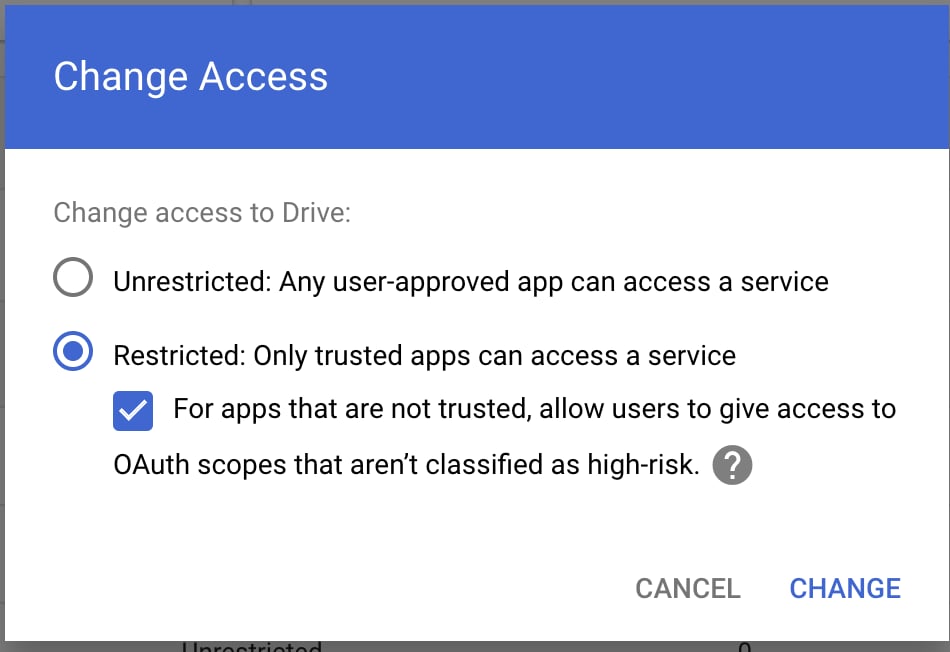
<p>소속 조직에서 액세스를 "제한 없음"으로 설정할 수 없는 경우, 다음의 대안을 시도해 보세요:</p>

<Steps>
  <Step title="&#x22;Restricted: Only trusted apps can access a service&#x22;를 선택합니다" />
</Steps>

<Frame>
  <a href="/help-center/help-center/assets/img/2b3275092b_image__281_29.png" rel="noreferrer nofollow noopener" target="_blank">
    <img alt="" height="652" src="https://mintcdn.com/perplexity-help-center/Qv3d0vQE9qMlZrQx/help-center/assets/img/2b3275092b_image__281_29.png?fit=max&auto=format&n=Qv3d0vQE9qMlZrQx&q=85&s=cbff87640e7e9d06e149366f7e6e7862" width="950" data-path="help-center/assets/img/2b3275092b_image__281_29.png" />
  </a>
</Frame>

<p>2. "신뢰할 수 없는 앱의 경우, 고위험으로 분류되지 않은 OAuth 스코프에 사용자가 액세스 권한을 부여하도록 허용"을 활성화합니다.</p>

<h3 id="h_288a396ade"><b>Drive SDK 설정</b></h3>

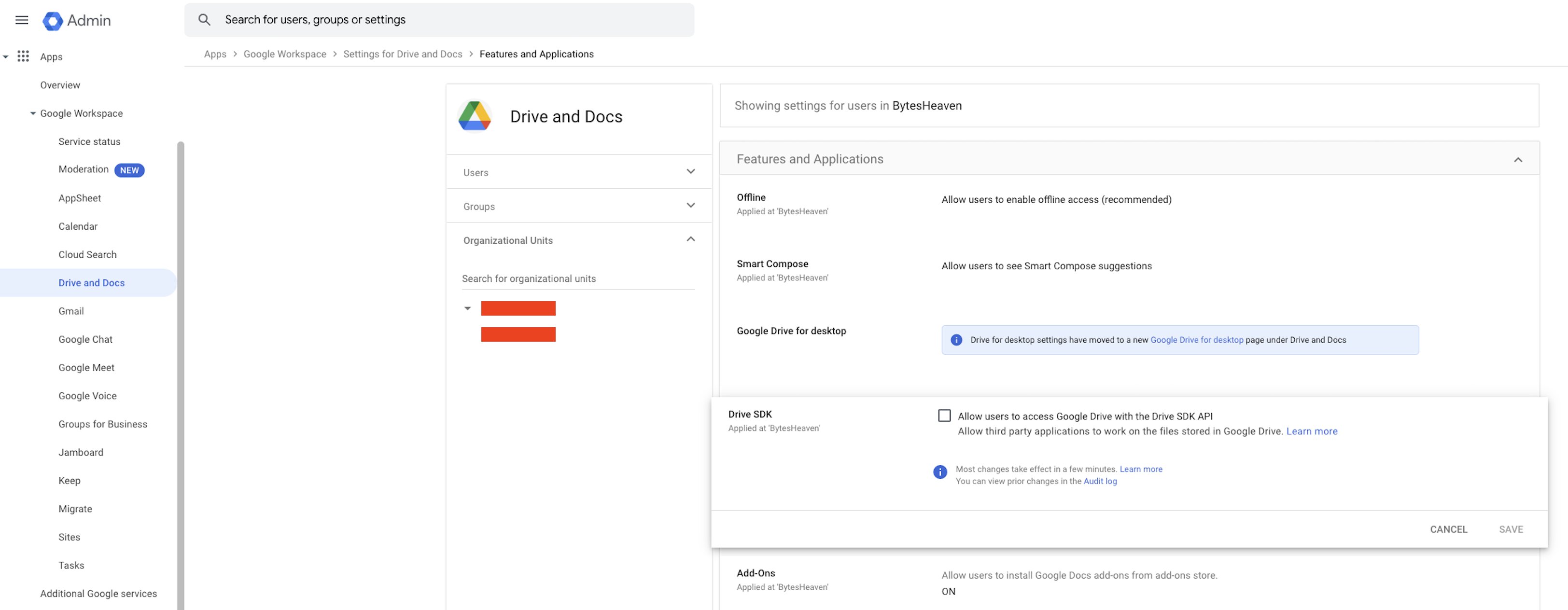
<p>Google Workspace 설정을 확인하십시오:</p>

<Steps>
  <Step>
    <p>이동 <b>Google Workspace</b> > <b>Drive 및 Docs</b> > <b>기능 및 활용</b> > <b>Drive SDK</b></p>
  </Step>

  <Step>
    <p>"Allow users to access Google Drive with the Drive SDK API"를 선택했는지 확인하십시오.</p>
  </Step>
</Steps>

<Frame>
  <a href="/help-center/help-center/assets/img/9733b5bc98_image__282_29.png" rel="noreferrer nofollow noopener" target="_blank">
    <img alt="" height="1264" src="https://mintcdn.com/perplexity-help-center/VSbT8XXdqBYCrHHo/help-center/assets/img/9733b5bc98_image__282_29.png?fit=max&auto=format&n=VSbT8XXdqBYCrHHo&q=85&s=cb3336c0518dc29a665bfad391bc6755" width="3248" data-path="help-center/assets/img/9733b5bc98_image__282_29.png" />
  </a>
</Frame>

<p>이 설정은 Perplexity가 사용자의 Google Drive 파일과 연동할 수 있도록 허용하므로 매우 중요합니다.</p>