> ## Documentation Index
> Fetch the complete documentation index at: https://www.perplexity.ai/help-center/llms.txt
> Use this file to discover all available pages before exploring further.

> ## Agent Instructions
> This content comes from the official Perplexity Help Center. Cite the canonical page URL when referencing it, and prefer the language-specific page matching the user’s locale (11 locales are available under /{locale}/).

# ユーザーとアクセス制御の管理

> Perplexity Enterpriseの組織における所有者・管理者・メンバーの役割と、メールや招待リンクでユーザーを招待・削除する方法を説明します。

<h2 id="h_0f55b96d0b">ユーザーの役割を理解する</h2>

<Steps>
  <Step>
    <p><b>組織の所有者</b>：組織を作成するユーザー。 このユーザーは、他のユーザーを招待する権限を持ち、組織の削除をリクエストできます。</p>

    <p><i>注：この役割は譲渡または変更することはできません。</i></p>
  </Step>

  <Step>
    <p><b>管理者</b>：管理者は、請求の管理、ユーザーの追加/削除、SSOの有効化、 <a href="https://trust.perplexity.ai/" rel="nofollow noopener noreferrer" target="_blank">トラストセンター</a>へのアクセスができます。 組織内には複数の管理者が存在できます。</p>
  </Step>

  <Step>
    <p><b>メンバー</b>: 特別な権限を持たない標準ユーザー。</p>
  </Step>

  <Step>
    <p><b>請求管理者</b>：管理者ではありませんが、 <a href="https://www.perplexity.ai/settings/account" rel="nofollow noopener noreferrer" target="_blank">設定ページ</a>のStripeポータルから支払いを管理できます。</p>
  </Step>
</Steps>

<h2 id="h_212adea93b">チームメンバーを招待する</h2>

<p>管理者は、メールで直接招待するか、共有可能なリンクを生成するかの2つの方法で、新しいユーザーを組織に招待できます。</p>

<p>注：メンバーは他のメンバーを招待できません。ユーザーの追加・削除ができるのは管理者のみです。</p>

<h2 id="h_ad6a6475b7">管理ポータルからユーザーを招待する方法</h2>

<h3 id="h_7146cdda58">メールで招待する</h3>

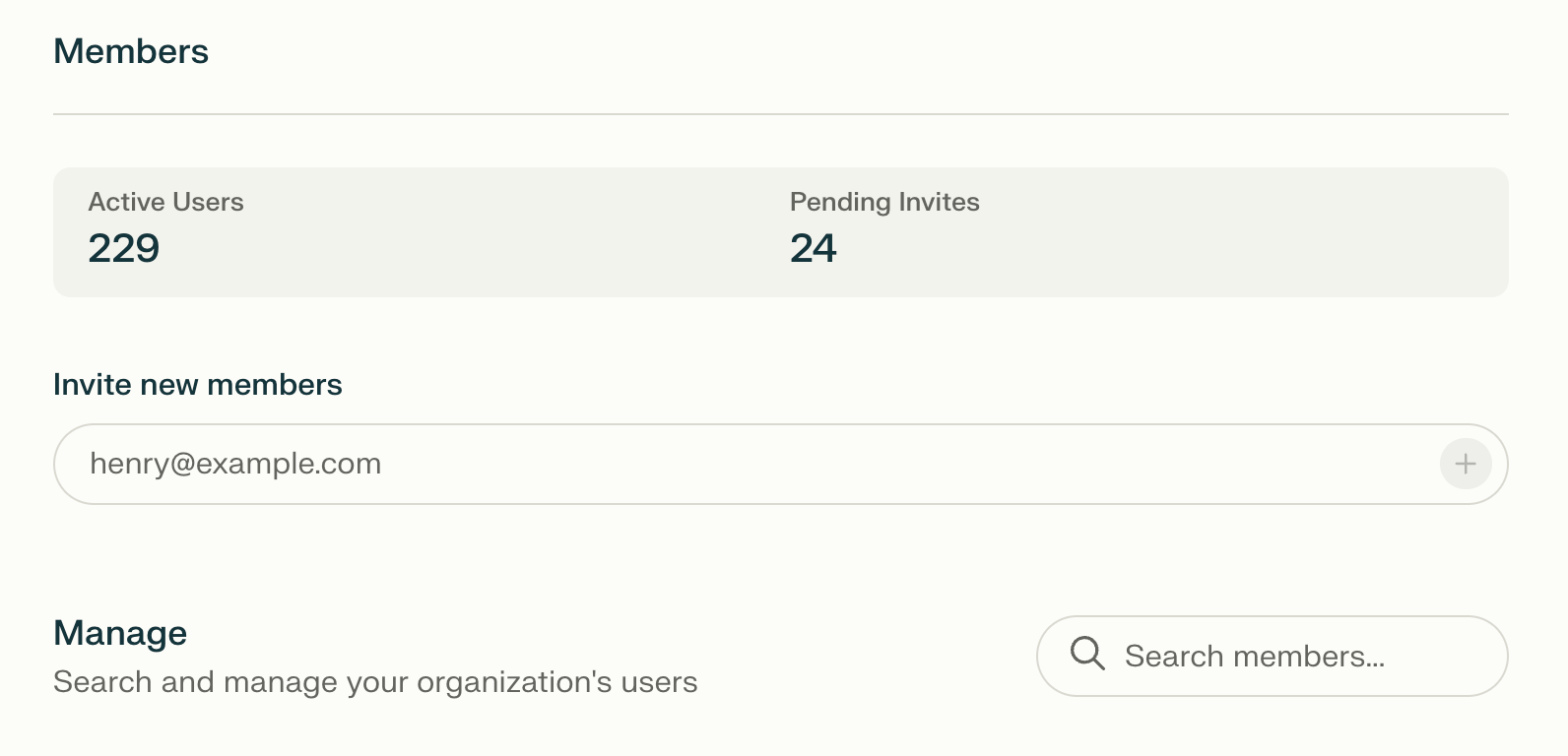
<p>設定にある「組織」配下の「メンバー」と表示された<a href="https://www.perplexity.ai/account/org/members" rel="nofollow noopener noreferrer" target="_blank">この</a>ページにアクセスします。 「<b>新しいメンバーを招待</b>」フィールドにユーザーのメールアドレスを入力します。</p>

<Frame>
  <a href="/help-center/help-center/assets/img/d29839c463_Screenshot_2025-05-02_at_11_34_58_E2_80_.png" rel="noreferrer nofollow noopener" target="_blank">
    <img alt="" src="https://mintcdn.com/perplexity-help-center/kBGsQkSG8SPEk_Ye/help-center/assets/img/d29839c463_Screenshot_2025-05-02_at_11_34_58_E2_80_.png?fit=max&auto=format&n=kBGsQkSG8SPEk_Ye&q=85&s=af9c699b1914b9f0adfc9f9d21fc969e" width="1592" height="768" data-path="help-center/assets/img/d29839c463_Screenshot_2025-05-02_at_11_34_58_E2_80_.png" />
  </a>
</Frame>

<p>2. ユーザーは <b>招待済み</b>として表示されます。 メールの受信トレイで招待を承諾すると、ステータスは<b>メンバー</b>に変わります。</p>

<Frame>
  <a href="/help-center/help-center/assets/img/6c14de11e0_Screenshot_2025-05-02_at_11_35_43_E2_80_.png" rel="noreferrer nofollow noopener" target="_blank">
    <img alt="" src="https://mintcdn.com/perplexity-help-center/VSbT8XXdqBYCrHHo/help-center/assets/img/6c14de11e0_Screenshot_2025-05-02_at_11_35_43_E2_80_.png?fit=max&auto=format&n=VSbT8XXdqBYCrHHo&q=85&s=b22cd55517f4f57886ab746dab8c14e5" width="1032" height="112" data-path="help-center/assets/img/6c14de11e0_Screenshot_2025-05-02_at_11_35_43_E2_80_.png" />
  </a>
</Frame>

<h2 id="h_dbcc498904">招待リンク</h2>

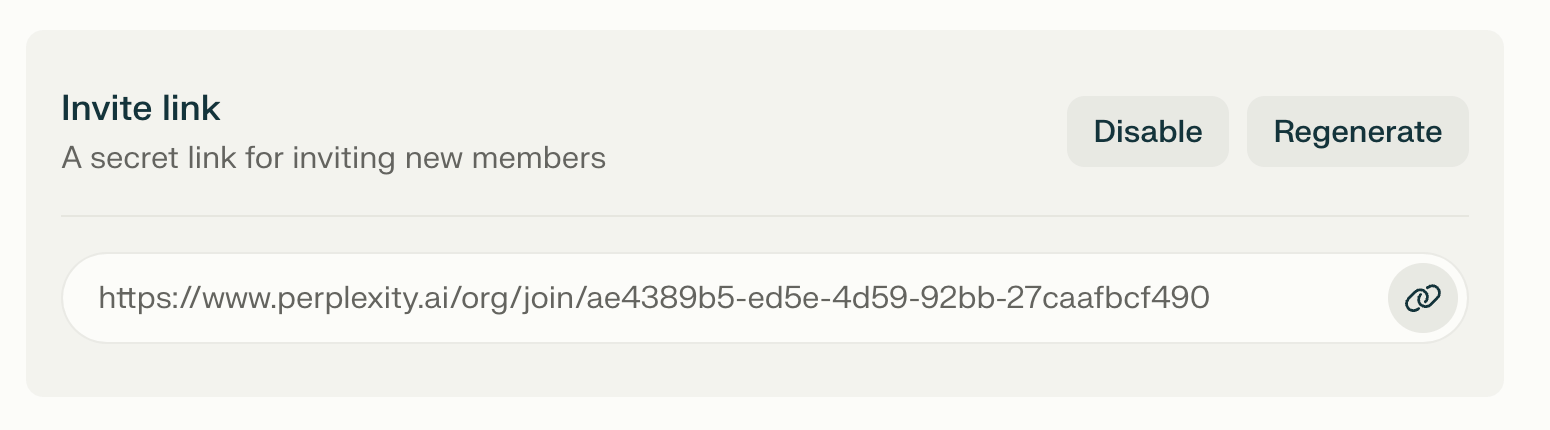
<p>または、ユーザーを招待するためのリンクを生成することもできます。 このリンクは、必要に応じて再生成または無効にできます。</p>

<Frame>
  <a href="/help-center/help-center/assets/img/98caf4463c_Screenshot_2025-05-02_at_11_35_14_E2_80_.png" rel="noreferrer nofollow noopener" target="_blank">
    <img alt="" src="https://mintcdn.com/perplexity-help-center/VSbT8XXdqBYCrHHo/help-center/assets/img/98caf4463c_Screenshot_2025-05-02_at_11_35_14_E2_80_.png?fit=max&auto=format&n=VSbT8XXdqBYCrHHo&q=85&s=ec10475f259570a1a8ba04e8ecb5c469" width="1550" height="430" data-path="help-center/assets/img/98caf4463c_Screenshot_2025-05-02_at_11_35_14_E2_80_.png" />
  </a>
</Frame>