> ## Documentation Index
> Fetch the complete documentation index at: https://www.perplexity.ai/help-center/llms.txt
> Use this file to discover all available pages before exploring further.

> ## Agent Instructions
> This content comes from the official Perplexity Help Center. Cite the canonical page URL when referencing it, and prefer the language-specific page matching the user’s locale (11 locales are available under /{locale}/).

# ファイル アプリ コネクタのトラブルシューティング（Pro 加入者向け）

> 問題が発生した場合の対処方法をいくつかご紹介します。

<h2 id="h_326bcf495b">Googleドライブの問題</h2>

<p>Google固有の設定により、統合がブロックされる場合があります。 修正方法は次のとおりです。</p>

<h2 id="h_697eaab86b">OAuthスコープ設定</h2>

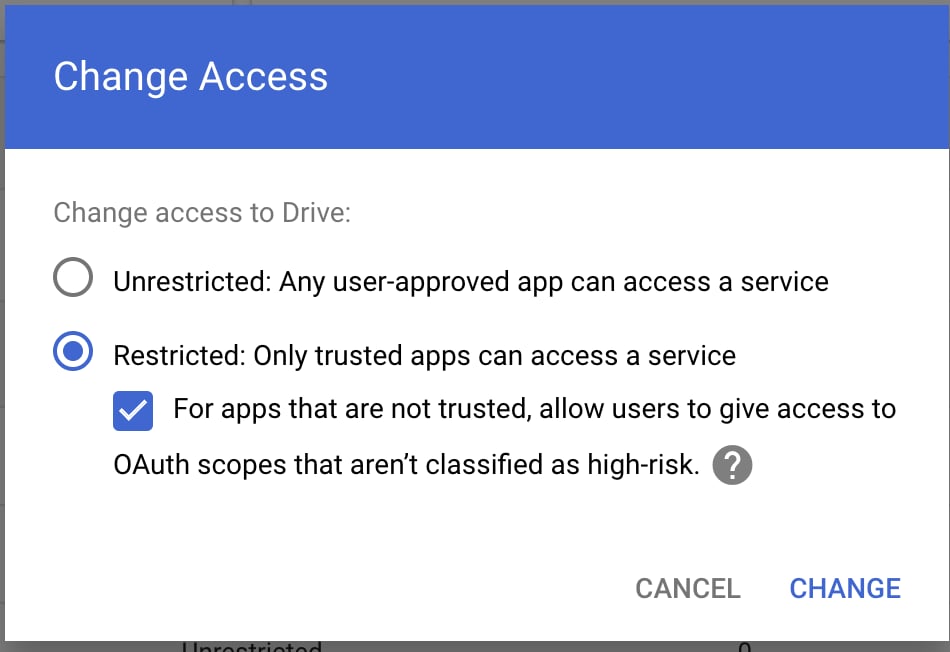
<p>組織でアクセスを「制限なし」に設定できない場合は、次の方法をお試しください。</p>

<Steps>
  <Step title="「制限付き: 信頼できるアプリのみがサービスにアクセス可能」を選択してください" />
</Steps>

<Frame>
  <a href="/help-center/help-center/assets/img/2b3275092b_image__281_29.png" rel="noreferrer nofollow noopener" target="_blank">
    <img alt="" src="https://mintcdn.com/perplexity-help-center/Qv3d0vQE9qMlZrQx/help-center/assets/img/2b3275092b_image__281_29.png?fit=max&auto=format&n=Qv3d0vQE9qMlZrQx&q=85&s=cbff87640e7e9d06e149366f7e6e7862" width="950" height="652" data-path="help-center/assets/img/2b3275092b_image__281_29.png" />
  </a>
</Frame>

<p>2. 「信頼されていないアプリでは、ユーザーが高リスクとして分類されていないOAuthスコープへのアクセスを許可できるようにする」を有効にします。</p>

<h2 id="h_288a396ade">ドライブSDKの設定</h2>

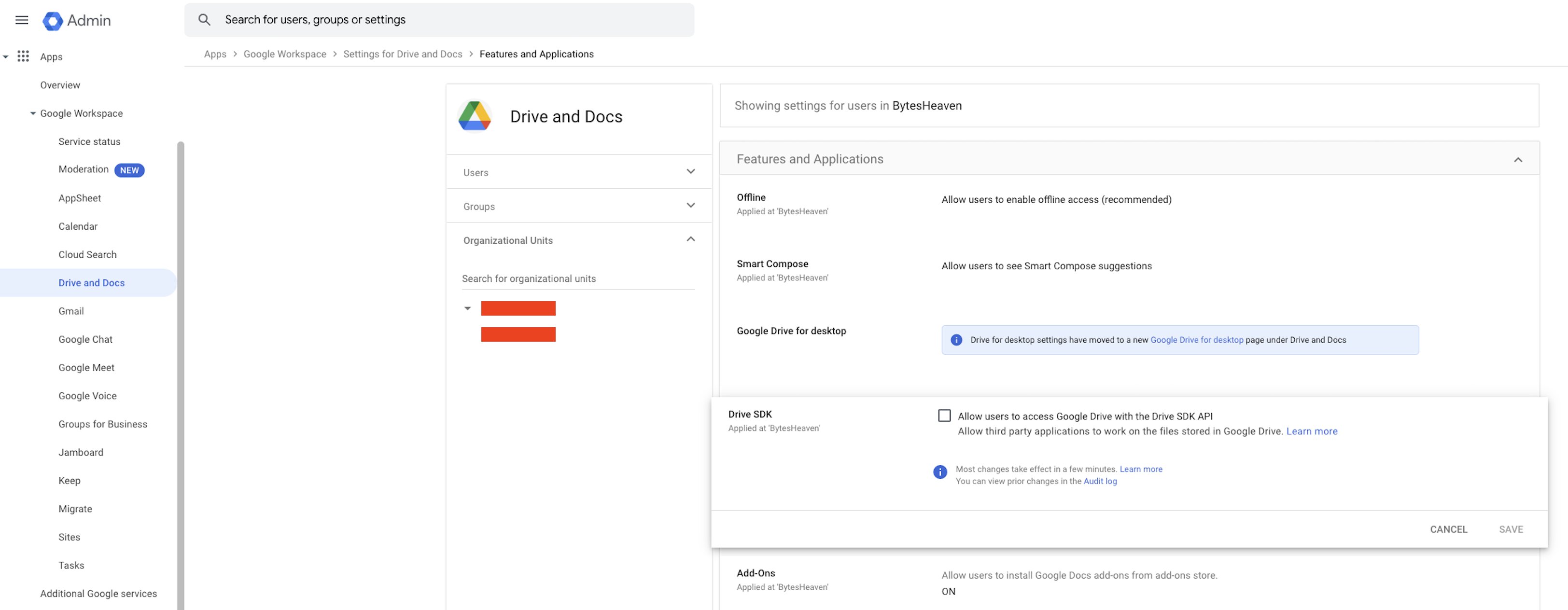
<p>Google Workspaceの設定を確認してください。</p>

<Steps>
  <Step>
    <p><b>Google Workspace</b> > <b>Drive と Docs</b> > <b>機能とアプリケーション</b> > <b>Drive SDK</b> に移動します</p>
  </Step>

  <Step>
    <p>「ユーザーが Drive SDK API を使用して Google Drive にアクセスできるようにする」を必ず選択してください</p>
  </Step>
</Steps>

<Frame>
  <a href="/help-center/help-center/assets/img/9733b5bc98_image__282_29.png" rel="noreferrer nofollow noopener" target="_blank">
    <img alt="" src="https://mintcdn.com/perplexity-help-center/VSbT8XXdqBYCrHHo/help-center/assets/img/9733b5bc98_image__282_29.png?fit=max&auto=format&n=VSbT8XXdqBYCrHHo&q=85&s=cb3336c0518dc29a665bfad391bc6755" width="3248" height="1264" data-path="help-center/assets/img/9733b5bc98_image__282_29.png" />
  </a>
</Frame>

<p>この設定は、Perplexity が Google Drive のファイルを利用できるようにするため、非常に重要です。</p>