> ## Documentation Index
> Fetch the complete documentation index at: https://www.perplexity.ai/help-center/llms.txt
> Use this file to discover all available pages before exploring further.

> ## Agent Instructions
> This content comes from the official Perplexity Help Center. Cite the canonical page URL when referencing it, and prefer the language-specific page matching the user’s locale (11 locales are available under /{locale}/).

# Perplexity Enterprise: Onboarding Guide

> Everything you need to get started with Perplexity Enterprise

<p>Welcome to Perplexity! We are excited for you to start your AI journey and explore the ways Perplexity can help you optimize your workflows and save you time as your AI research assistant.</p>

<p>Perplexity Enterprise offers two tiers designed for organizations: <b><a href="/help-center/help-center/en/articles/10352973-what-is-enterprise-pro">Enterprise Pro</a></b> and <b><a href="/help-center/help-center/en/articles/12310544-what-is-enterprise-max">Enterprise Max</a></b>.</p>

<p>The onboarding process below allows organizations to create an Enterprise organization, invite team members, select subscription plans, and configure payment options.</p>

<h2 id="h_cce2750c40"><b>Creating an Organization</b></h2>

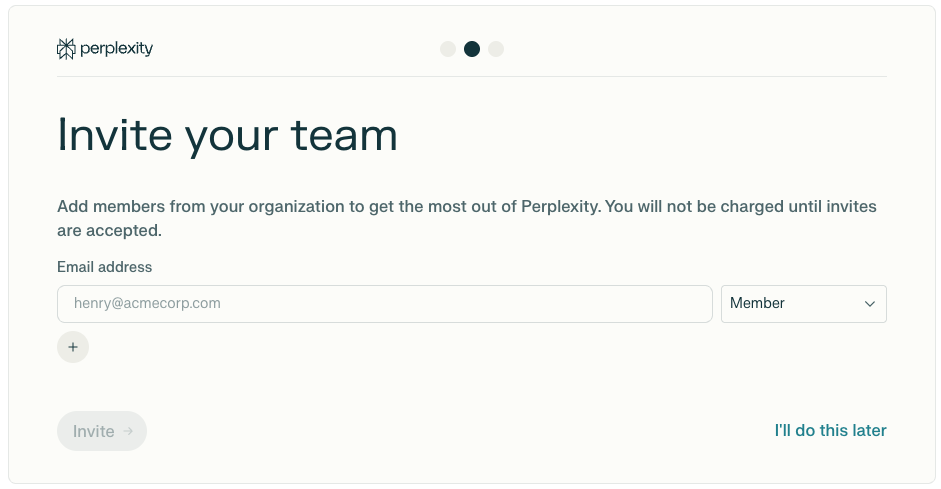
<p>To use Enterprise features, you will need to create an Enterprise organization:</p>

<Steps>
  <Step>
    <p>Log in to Perplexity on a web browser</p>
  </Step>

  <Step>
    <p>Go to <a href="https://www.perplexity.ai/account/details" rel="nofollow noopener noreferrer" target="_blank">Account Settings</a> where you will see the <b>Enterprise</b> option, or visit directly: <a href="https://www.perplexity.ai/enterprise" rel="nofollow noopener noreferrer" target="_blank">perplexity.ai/enterprise</a></p>
  </Step>

  <Step>
    <p>Enter your organization’s name. You will be able to change this later.</p>
  </Step>

  <Step>
    <p>Accept <a href="https://www.perplexity.ai/hub/legal/enterprise-terms-of-service" rel="nofollow noopener noreferrer" target="_blank">Perplexity’s Enterprise Terms and Conditions</a></p>
  </Step>

  <Step>
    <p>The organization will be created with you as the initial owner/admin</p>
  </Step>
</Steps>

<Frame>
  <a href="../../assets/img/6a12908ae5_c9ecb985-cc93-4831-a169-47abc82593f3.png" rel="noreferrer nofollow noopener" target="_blank">
    <img alt="" height="613" src="https://mintcdn.com/perplexity-help-center/VSbT8XXdqBYCrHHo/help-center/assets/img/6a12908ae5_c9ecb985-cc93-4831-a169-47abc82593f3.png?fit=max&auto=format&n=VSbT8XXdqBYCrHHo&q=85&s=326f634ee8cc9666d9b934bfd1568da1" width="940" data-path="help-center/assets/img/6a12908ae5_c9ecb985-cc93-4831-a169-47abc82593f3.png" />
  </a>
</Frame>

<h2 id="h_4142ed30a2"><b>Invite Team Members</b></h2>

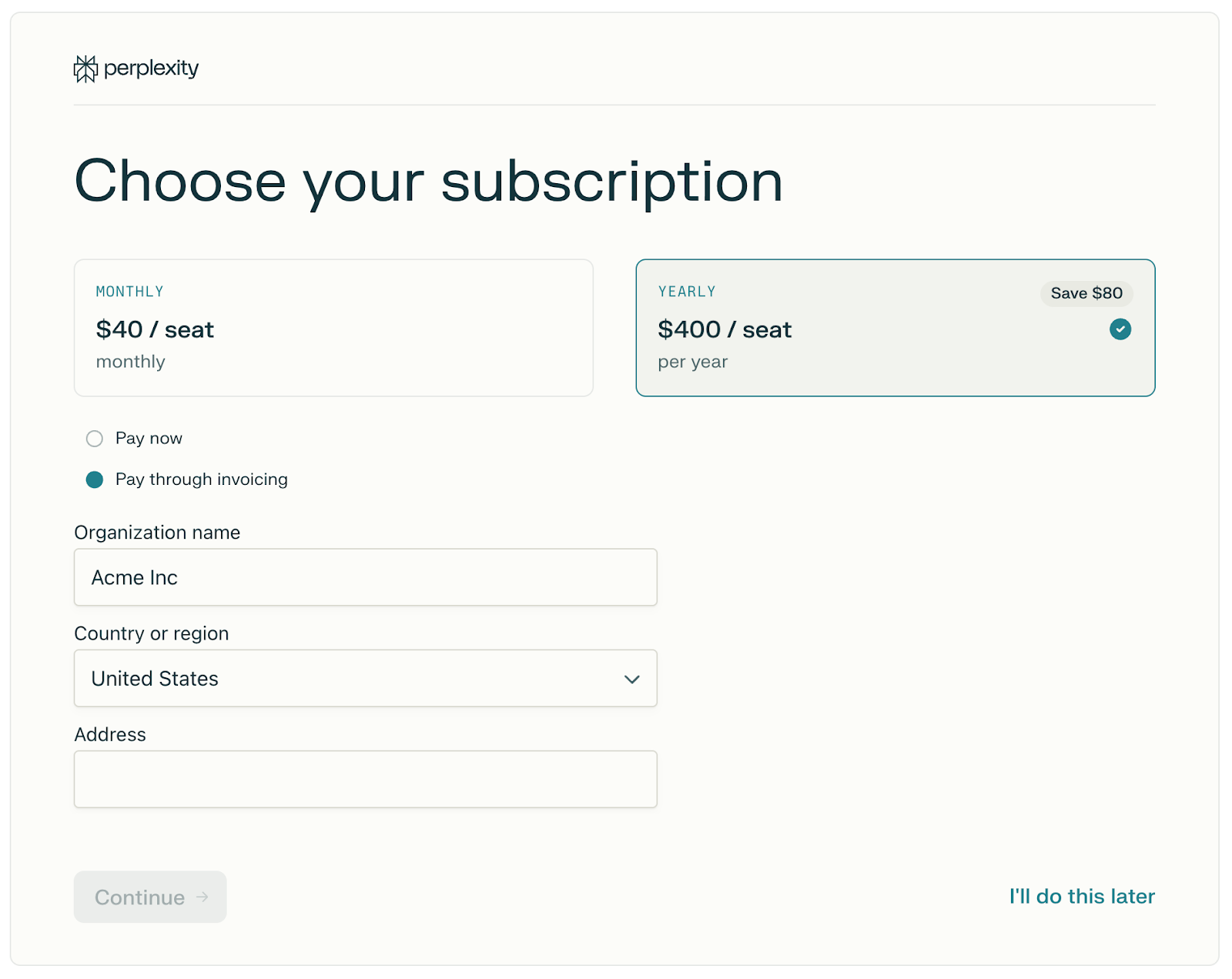
<p>To unlock Perplexity’s collaboration capabilities, you will need to add team members to your organization. You can do this during onboarding, or at any time once your organization is up and running:</p>

<Steps>
  <Step>
    <p>Entering the email addresses of the members you want to add.</p>
  </Step>

  <Step>
    <p>Set roles for each member you add (Admin or Member)</p>
  </Step>

  <Step>
    <p>Click <b>Invite</b>, or <b>I’ll do this later</b> if you want to skip this step and invite members later</p>
  </Step>
</Steps>

<p>You will only be charged for members who accept the invitation and join.</p>

<Frame>
  <a href="../../assets/img/45f1d739ba_57a92122-12dc-4954-849b-84d79b5eac11.png" rel="noreferrer nofollow noopener" target="_blank">
    <img alt="" height="489" src="https://mintcdn.com/perplexity-help-center/Qv3d0vQE9qMlZrQx/help-center/assets/img/45f1d739ba_57a92122-12dc-4954-849b-84d79b5eac11.png?fit=max&auto=format&n=Qv3d0vQE9qMlZrQx&q=85&s=9a930b7a32987690fef6594e1ee92bd3" width="941" data-path="help-center/assets/img/45f1d739ba_57a92122-12dc-4954-849b-84d79b5eac11.png" />
  </a>
</Frame>

<p>Additionally, you will be able to invite new members via email, or you can create a shareable invite link (requires Admin access) that you can distribute within your organization.</p>

<h2 id="h_30f6bb2aef"><b>Subscription Plan Selection</b></h2>

<p>You can choose between two Enterprise tiers:</p>

<p><b>Enterprise Pro:</b></p>

<ul>
  <li>
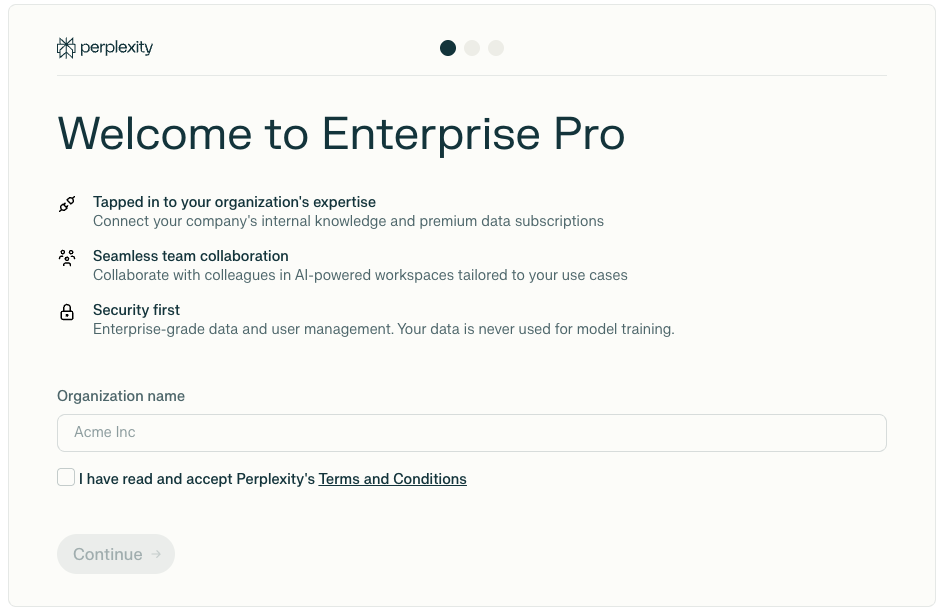
    <p>Monthly: \$40 per seat</p>
  </li>

  <li>
    <p>Yearly: \$400 per seat (20% discount)</p>
  </li>
</ul>

<p><b>Enterprise Max:</b></p>

<ul>
  <li>
    <p>Monthly: \$325 per seat</p>
  </li>

  <li>
    <p>Yearly: \$3,250 per seat</p>
  </li>
</ul>

<p>Organizations can mix both Pro and Max seats, and the tier and number of seats can be changed at by an admin, for additional flexibility based on individual user needs. You can learn more about managing users <a href="/help-center/help-center/en/articles/10352978-user-management-for-enterprise-organizations">here</a>.</p>

<p>During your first month of subscription, you’ll be charged for the number of seats you selected during onboarding.</p>

<p>Because there’s a 30‑day seat commitment period, any seat removals will only show up in your billing after the first month.</p>

<h2 id="h_615e4a0819"><b>Payment Options</b></h2>

<p>The following payment methods are available for Enterprise plans:</p>

<ul>
  <li>
    <p>Credit/debit card: Visa, MasterCard, AMEX</p>
  </li>

  <li>
    <p>Invoice: contact us for invoice billing with 7-day payment terms (annual subscriptions only)</p>
  </li>

  <li>
    <p>Bank/wire transfer: available when choosing invoice payment</p>
  </li>
</ul>

<Frame>
  <a href="../../assets/img/8aaf9459e1_6efadad7-44e2-4bbd-bcae-dd90c47339cf.png" rel="noreferrer nofollow noopener" target="_blank">
    <img alt="" height="1272" src="https://mintcdn.com/perplexity-help-center/VSbT8XXdqBYCrHHo/help-center/assets/img/8aaf9459e1_6efadad7-44e2-4bbd-bcae-dd90c47339cf.png?fit=max&auto=format&n=VSbT8XXdqBYCrHHo&q=85&s=138a474ce1640200065199a2d1e8c030" width="1600" data-path="help-center/assets/img/8aaf9459e1_6efadad7-44e2-4bbd-bcae-dd90c47339cf.png" />
  </a>
</Frame>

<p>We offer a 25% discount on Enterprise Pro seats for Educational institutions, non-profits, and government agencies.</p>

<p>Please note that the subscription must be paid for all added members before Enterprise features activate. Otherwise, functionality will be limited for all organization members.</p>

<p>Additionally, custom terms and invoicing are available for organizations requiring 250+ seats. These organizations (White Glove) receive dedicated customer success manager (CSM) services, and are provided the option to negotiate contract terms and conditions with Perplexity AI.</p>

<h2 id="h_354308d501"><b>Applying Promotional Codes</b></h2>

<p>If you have a coupon or discount code that applies to Enterprise plans:</p>

<Steps>
  <Step>
    <p>Go to <a href="https://www.perplexity.ai/enterprise" rel="nofollow noopener noreferrer" target="_blank">perplexity.ai/enterprise</a> while signed in to the account you wish to upgrade</p>
  </Step>

  <Step>
    <p>Follow the onboarding process</p>
  </Step>

  <Step>
    <p>Enter the promo code during checkout (in <b>Add promotion code</b>)</p>
  </Step>
</Steps>

<p>The discounted total will display, and you will be able to complete the purchase.</p>

<h2 id="h_70e437f32f"><b>Transitioning from Personal Pro/Max</b></h2>

<p>If you have an existing Pro or Max subscription, you can seamlessly transition to Enterprise.</p>

<p>Your previous subscription will be automatically canceled when choosing an Enterprise plan, and any unused time will be credited toward the next Enterprise invoice (on renewal).</p>

<p>You will keep access to existing sessions/projects, which will remain private unless you explicitly share them with your organization.</p>

<h2 id="h_9d418ced27"><b>Managing your Organization</b></h2>

<p>Organization admins can perform the following tasks from <a href="https://www.perplexity.ai/account/org/details" rel="nofollow noopener noreferrer" target="_blank">Organization settings</a>:</p>

<ul>
  <li>
    <p>Manage organization name, logo, and other details</p>
  </li>

  <li>
    <p><a href="/help-center/help-center/en/articles/10352978-user-management-for-enterprise-organizations">Add or remove members</a> through the Members screen</p>
  </li>

  <li>
    <p><a href="/help-center/help-center/en/articles/11187557-how-to-manage-enterprise-billing">Configure billing</a> through Manage billing portal</p>
  </li>

  <li>
    <p>Enable security features and <a href="/help-center/help-center/en/articles/11187754-enterprise-roles-and-permissions">permissions</a> as needed</p>
  </li>

  <li>
    <p>Connect the organization’s identity provider for users in the organization to sign in from (<a href="/help-center/help-center/en/articles/11200832-sso-integration-getting-started">SSO</a>)</p>
  </li>
</ul>

<p>You can find more information in <a href="/help-center/help-center/en/articles/12067853-introduction-to-organization-admins">this article</a>.</p>

<h2 id="h_d03c152686"><b>Questions?</b></h2>

<p>Get in touch if you have any questions.</p>

<p>We look forward to supporting your successful journey with Perplexity!</p>


## Related topics

- [Enterprise admin hub](/help-center/help-center/en/enterprise.md)
- [Perplexity Enterprise](/help-center/help-center/en/collections/11312901-perplexity-enterprise.md)
- [Getting started with FedRAMP 20x Secure Configuration](/help-center/help-center/en/articles/14714627-getting-started-with-fedramp-20x-secure-configuration.md)
- [Enterprise Connector Troubleshooting Guide](/help-center/help-center/en/articles/10673201-enterprise-connector-troubleshooting-guide.md)
- [How credits work for Enterprise organizations — admin guide](/help-center/help-center/en/articles/13901296-how-credits-work-for-enterprise-organizations-admin-guide.md)