> ## Documentation Index
> Fetch the complete documentation index at: https://www.perplexity.ai/help-center/llms.txt
> Use this file to discover all available pages before exploring further.
> ## Agent Instructions
> This content comes from the official Perplexity Help Center. Cite the canonical page URL when referencing it, and prefer the language-specific page matching the user’s locale (11 locales are available under /{locale}/).
# Setting up the Perplexity Android Assistant
> Set Perplexity as the default assistant app on Android and remap the launch button or side key on Samsung, Xiaomi, and Huawei devices.
Button Remapping
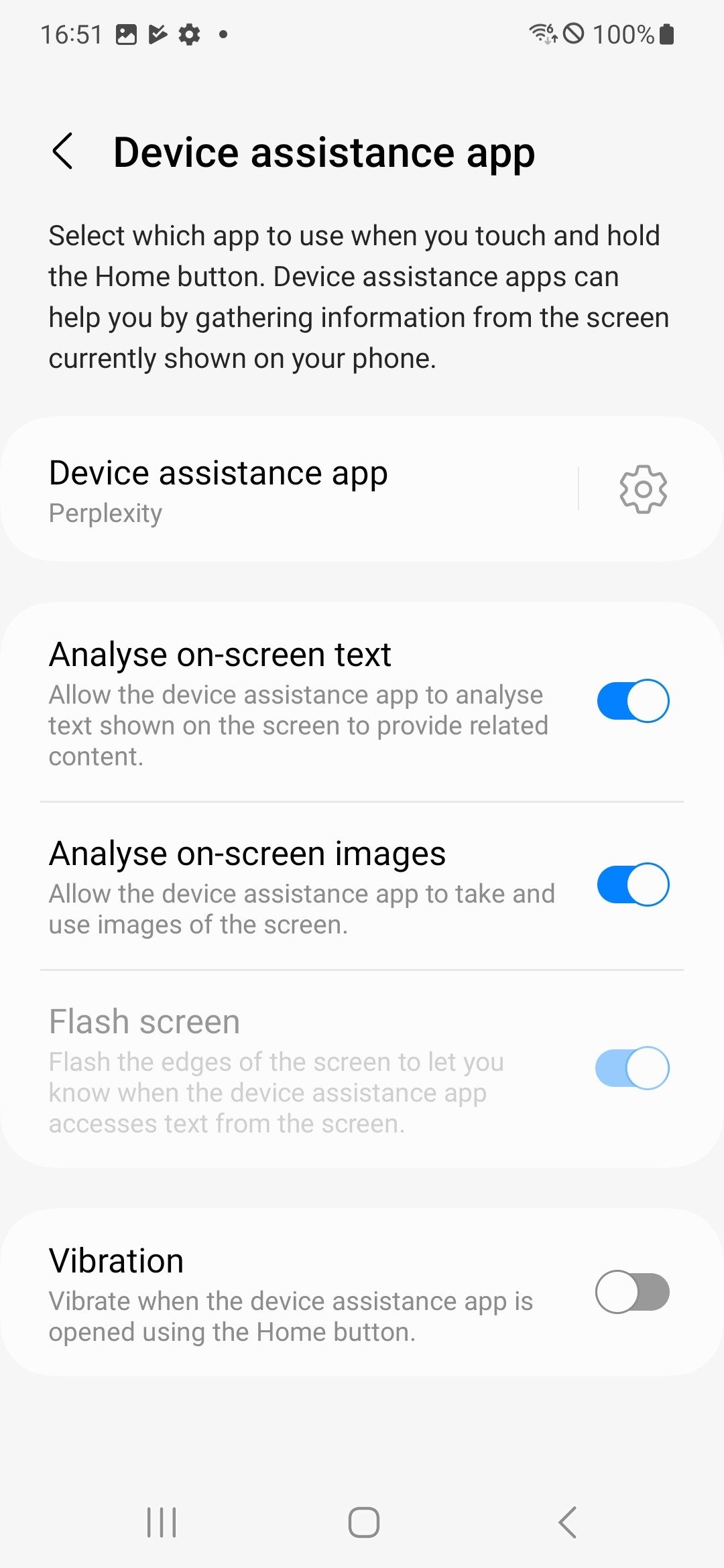
Here's how to remap the launch button for the Perplexity Android Assistant
Open Settings > Go to Apps > Default Apps > Digital assist app > select Perplexity
Physical button reset
-
On Samsung device: Side key settings
-
On Xiaomi device: Quick ball customization
-
On Huawei device: Smart assistant toggle
## Related topics
- [Mobile Apps](/help-center/help-center/en/collections/18799299-mobile-apps.md)
- [How to Use the Perplexity Android Assistant](/help-center/help-center/en/articles/10450852-how-to-use-the-perplexity-android-assistant.md)
- [Setting up SSO with Okta](/help-center/help-center/en/articles/12844186-setting-up-sso-with-okta.md)
- [Getting Started with Comet: Set Up](/help-center/help-center/comet/en/articles/11583745-getting-started-with-comet-set-up.md)
- [Account Settings](/help-center/help-center/en/articles/10352993-account-settings.md)