> ## Documentation Index
> Fetch the complete documentation index at: https://www.perplexity.ai/help-center/llms.txt
> Use this file to discover all available pages before exploring further.

> ## Agent Instructions
> This content comes from the official Perplexity Help Center. Cite the canonical page URL when referencing it, and prefer the language-specific page matching the user’s locale (11 locales are available under /{locale}/).

# What is a Session?

> Learn what a session is in Perplexity: a conversation that keeps context across follow-up questions, saves sources, and builds on earlier answers.

<h2 id="h_d30bee8179">What is a Session?</h2>

<p>A session is like a <b>conversation history</b> that remembers everything you've discussed with Perplexity's AI. Unlike traditional search queries that operate in isolation, sessions enable seamless, contextual conversations that build upon previous exchanges within the session. A session will include your initial question, any follow-up queries, all of Perplexity's responses and all sources used to provide your answer.</p>

<h2 id="h_7030284902">Core functions of Sessions</h2>

<h3 id="h_bda76b5803">Seamless conversation</h3>

<p>Sessions work like a conversation project that keeps track of all the messages you exchange with Perplexity, <b>remembering what you've talked about and keeping your discussion flowing smoothly from one question to the next.</b> When you ask a follow-up question or when the AI gives you a response, it understands what you've been discussing together throughout your entire conversation. This way you receive answers that make more sense and are more helpful for what you're trying to learn or accomplish.</p>

<h3 id="h_0561dc82ae">Persistent memory</h3>

<p>Because the AI has “memory”, it can <b>automatically handle context management even as conversations grow longer</b>. This eliminates the need for you to manually repeat background information or context in subsequent queries.</p>

<h3 id="h_b94f07d342">Source transparency</h3>

<p>By weaving reliable sources directly into every session, Perplexity turns answers into <i>traceable mini-research papers</i>: <b>transparent, verifiable, and easy to build upon. This ensures higher answer quality.</b></p>

<h2 id="h_2378483c25">What can I use Sessions for?</h2>

<h3 id="h_51149c6562">Deep topic exploration</h3>

<p>You can ask follow-up questions to dig deeper or explore new angles within a single session. This <b>allows for comprehensive exploration of all sorts of topics without losing the context </b>established in earlier exchanges.</p>

<h3 id="h_3b880e9945">Iterative problem solving</h3>

<p>Sessions support iterative workflows where you can:</p>

<ul>
  <li>
    <p>Build upon previous responses to refine your understanding of the topic</p>
  </li>

  <li>
    <p>Ask clarifying questions that reference earlier parts of the conversation</p>
  </li>

  <li>
    <p>Develop ideas progressively through multiple exchanges</p>
  </li>
</ul>

<h3 id="h_49c3f7a89b">Context-aware research</h3>

<p>Since sessions <b>ensure that the conversation history is maintained</b>, you can conduct research where each query builds upon previous findings, creating a more coherent and comprehensive research experience.</p>

<h2 id="h_aa8e0002e1">Your Sessions history</h2>

<p>Every session is stored in your<b> History</b> (<a href="https://www.perplexity.ai/library" rel="nofollow noopener noreferrer" target="_blank">perplexity.ai/library</a>)<b> </b>which is only accessible to you. In your History you can <b>view previous sessions</b> and continue earlier conversations.</p>

<p>Sessions are stored in the History indefinitely but you can delete individual or all sessions at any time. Furthermore, you can filter your sessions by Search Mode (Pro, Research, or Create files and apps query) and from newest to oldest and vice versa.</p>

<p>If you use the Perplexity<b> <a href="/help-center/help-center/en/articles/11521526-perplexity-tasks">Tasks</a> </b>feature your Tasks sessions will also show in your History.</p>

<h2 id="h_7af7d8c7e5">Creating, managing and sharing Sessions</h2>

<h3 id="h_4bd6eee35c">Creating Sessions</h3>

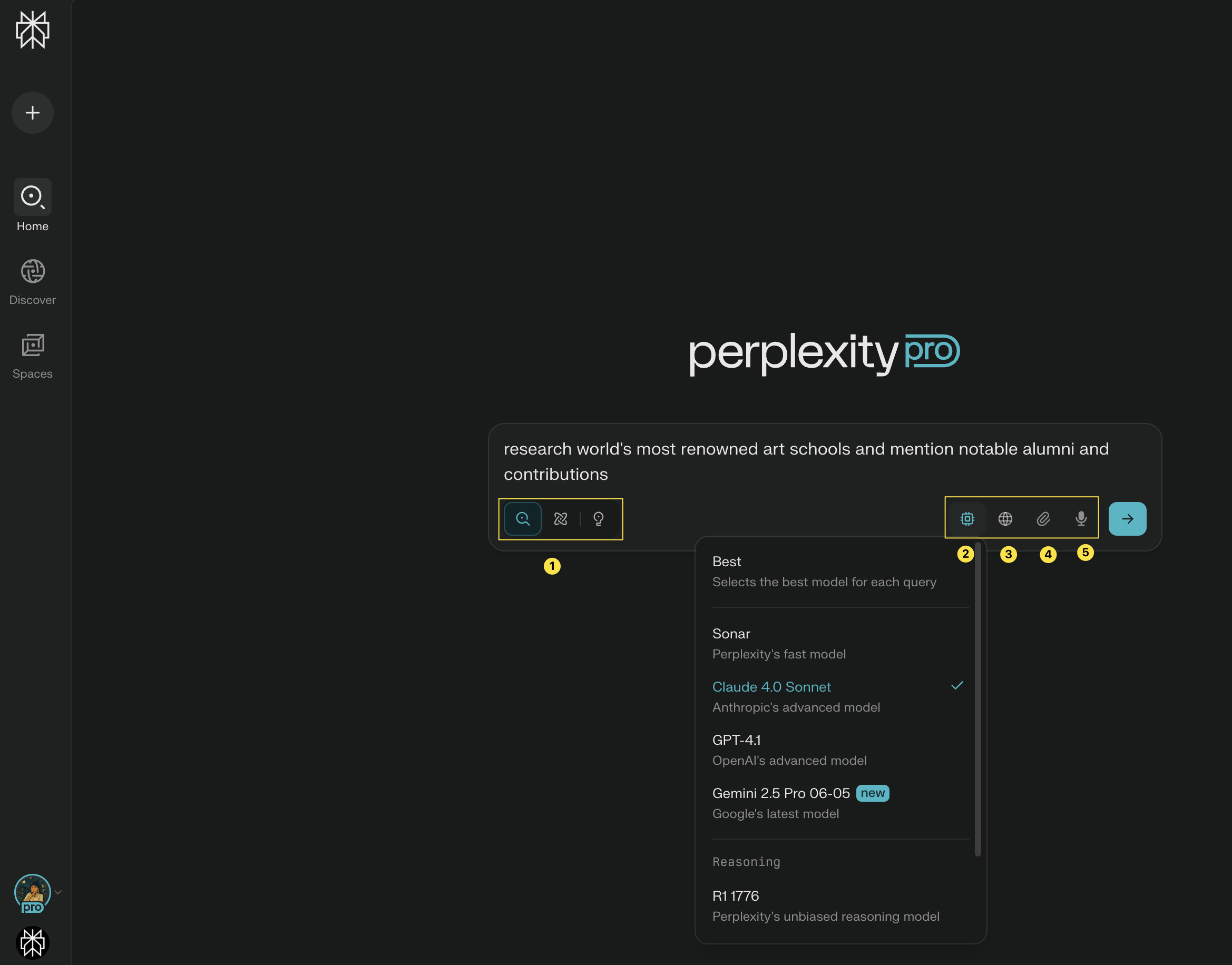
<p>Creating a session is simple. To get started, <b>go to the Search query box </b>on your homepage and start typing your question or ask, i.e. your prompt.</p>

<p>If you’re a <b>paid subscriber</b> you will also have the option to select from different <b>Search Modes: <a href="/help-center/help-center/en/articles/10352903-what-is-pro-search">Pro</a>, <a href="/help-center/help-center/en/articles/10738684-what-is-research-mode">Research</a>, and Create files and apps (1)</b> and <b>select your AI model of choice (2)</b>. You can also specify your <b>Sources, like Web or Academic (3)</b> and <b>attach files (4)</b>. You can also <b>dictate your prompt</b>. Just click the <b>microphone icon (5)</b>.</p>

<Frame>
  <a href="../../assets/img/ce7dc83134_CleanShot_2025-07-25_at_16_21_57_402x.png" rel="noreferrer nofollow noopener" target="_blank">
    <img alt="" height="1832" src="https://mintcdn.com/perplexity-help-center/kBGsQkSG8SPEk_Ye/help-center/assets/img/ce7dc83134_CleanShot_2025-07-25_at_16_21_57_402x.png?fit=max&auto=format&n=kBGsQkSG8SPEk_Ye&q=85&s=8be8fdffb1d2a4c55c8c88a8ab4f444f" width="2338" data-path="help-center/assets/img/ce7dc83134_CleanShot_2025-07-25_at_16_21_57_402x.png" />
  </a>
</Frame>

<h3 id="h_5c116a8f3c">Managing your Sessions</h3>

<p>To manage your sessions, go to your History page: <a href="https://www.perplexity.ai/library" rel="nofollow noopener noreferrer" target="_blank">perplexity.ai/library</a>.</p>

<p><b>In your History:</b></p>

<ul>
  <li>
    <p>You will be able to see all of your sessions and use the <b>Search bar</b> to find specific sessions</p>
  </li>

  <li>
    <p>Click <b>Select</b> to select <b>multiple sessions for deletion</b></p>
  </li>

  <li>
    <p>Use <b>Type </b>to sort sessions by Search Mode (sessions created in Research or Create files and apps)</p>
  </li>

  <li>
    <p>Hide or show sessions created <b>via Comet browser</b></p>
  </li>

  <li>
    <p>Use <b>Sorting</b> to sort from Newest to Oldest and vice versa</p>
  </li>

  <li>
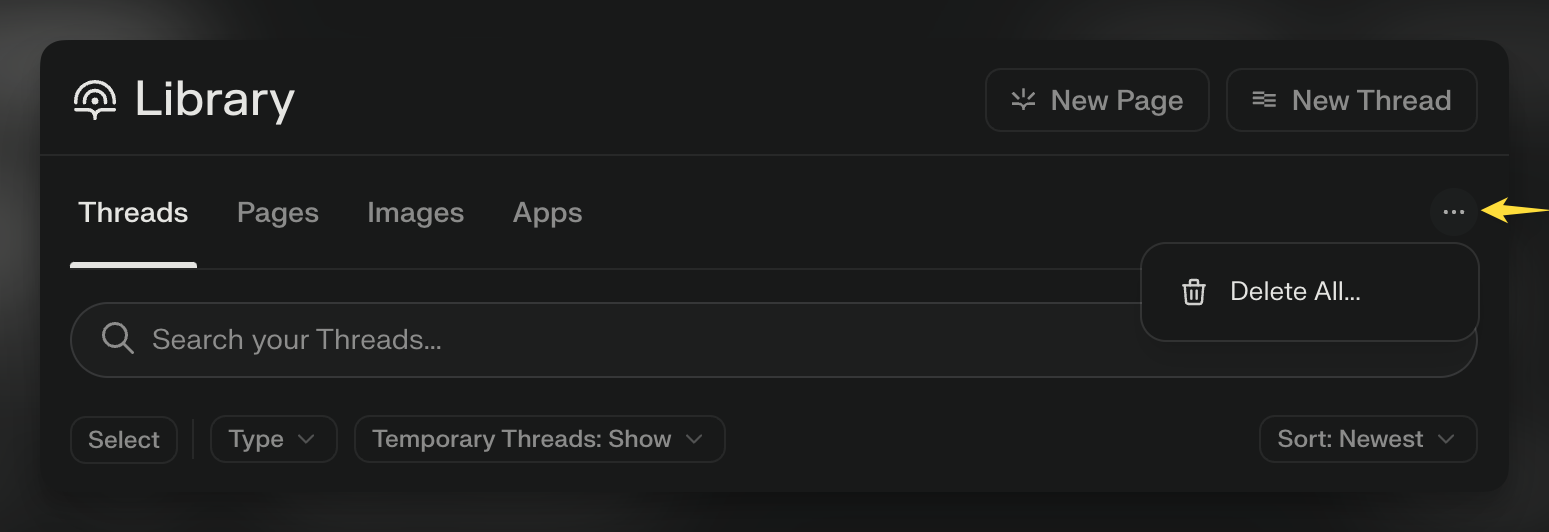
    <p>To <b>delete all</b> sessions in one go, click the dots menu on the right side of the screen:</p>

    <Frame>
      <a href="../../assets/img/d4ae466c5e_CleanShot_2025-07-31_at_15_47_14_402x.png" rel="noreferrer nofollow noopener" target="_blank">
        <img alt="" height="532" src="https://mintcdn.com/perplexity-help-center/kBGsQkSG8SPEk_Ye/help-center/assets/img/d4ae466c5e_CleanShot_2025-07-31_at_15_47_14_402x.png?fit=max&auto=format&n=kBGsQkSG8SPEk_Ye&q=85&s=db2b056354cb28af627c65576007375c" width="1549" data-path="help-center/assets/img/d4ae466c5e_CleanShot_2025-07-31_at_15_47_14_402x.png" />
      </a>
    </Frame>
  </li>

  <li>
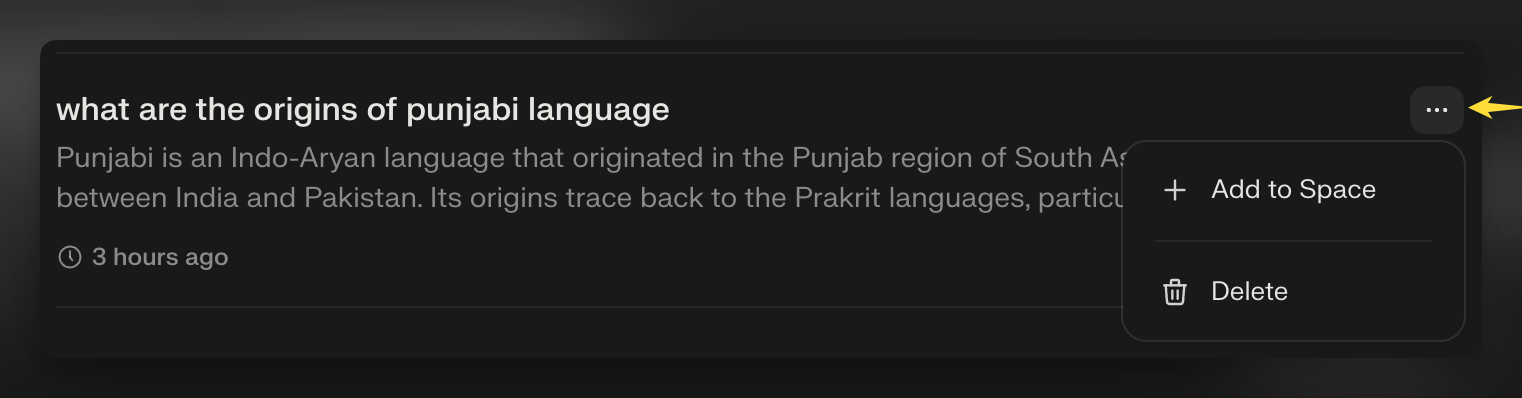
    <p>Alternatively, you can click the three dots menu on a specific session to either delete the session or <b>Add it to a <a href="/help-center/help-center/en/articles/10352961-what-are-spaces">project</a>:</b></p>
  </li>
</ul>

<Frame>
  <a href="../../assets/img/d558759864_CleanShot_2025-07-31_at_15_51_55_402x.png" rel="noreferrer nofollow noopener" target="_blank">
    <img alt="" height="398" src="https://mintcdn.com/perplexity-help-center/kBGsQkSG8SPEk_Ye/help-center/assets/img/d558759864_CleanShot_2025-07-31_at_15_51_55_402x.png?fit=max&auto=format&n=kBGsQkSG8SPEk_Ye&q=85&s=6e638f57d9bd33998a076c674b882055" width="1522" data-path="help-center/assets/img/d558759864_CleanShot_2025-07-31_at_15_51_55_402x.png" />
  </a>
</Frame>

<h3 id="h_b1f68f6df2">Sharing your Sessions and more actions</h3>

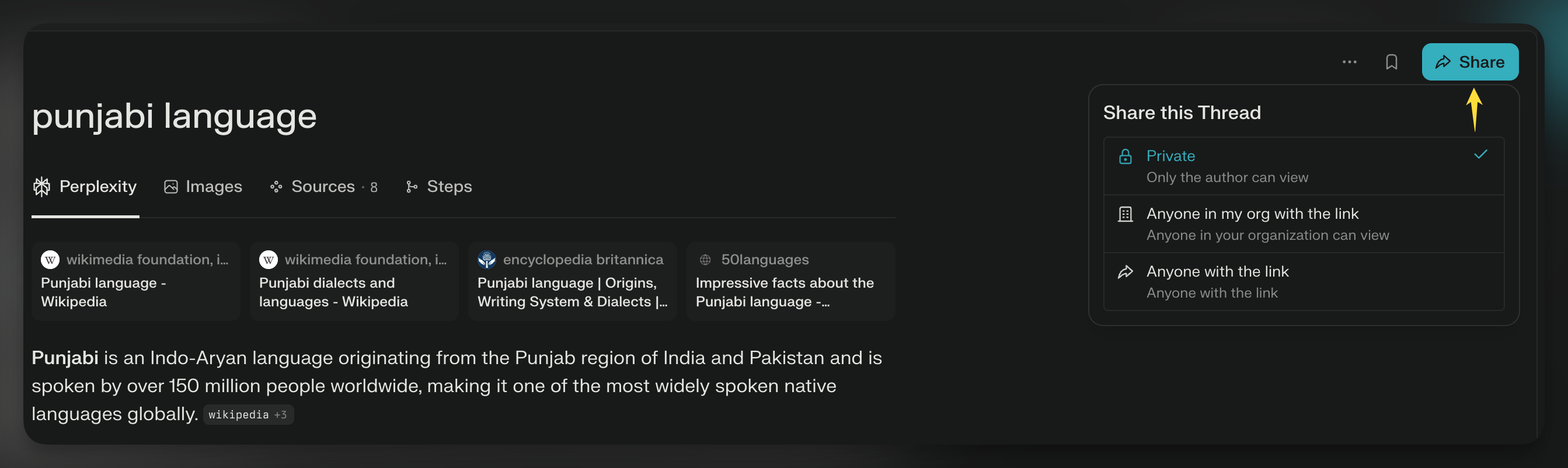
<p>To share a session, click the Share button on the top right side of the screen:</p>

<Frame>
  <a href="../../assets/img/ce5311d906_CleanShot_2B2025-07-31_2Bat_2B16_05_48-4.png" rel="noreferrer nofollow noopener" target="_blank">
    <img alt="" height="802" src="https://mintcdn.com/perplexity-help-center/kBGsQkSG8SPEk_Ye/help-center/assets/img/ce5311d906_CleanShot_2B2025-07-31_2Bat_2B16_05_48-4.png?fit=max&auto=format&n=kBGsQkSG8SPEk_Ye&q=85&s=8d0ecb9b2968ffefcd4b035faad2f188" width="2686" data-path="help-center/assets/img/ce5311d906_CleanShot_2B2025-07-31_2Bat_2B16_05_48-4.png" />
  </a>
</Frame>

<p>You can select from a few sharing options:</p>

<ul>
  <li>
    <p><b>Private: </b>The session stays private (only you as the Author can view its content) even if you have pasted the link somewhere publicly</p>
  </li>

  <li>
    <p><b>Anyone with the link: </b>anyone who has the link can open and view the content of the session and also share it on to others. If you no longer want the session to be public, <b>you can change it back to Private (see above)</b></p>
  </li>

  <li>
    <p><b>Anyone in my org with the link (for Enterprise Pro subscribers only)</b></p>
  </li>
</ul>

<p>When a session is <b>public, </b>anyone with access to the session can also add follow-up questions to but this will <b>create a new session</b> for the user (it won't add the follow-up to the existing session).</p>

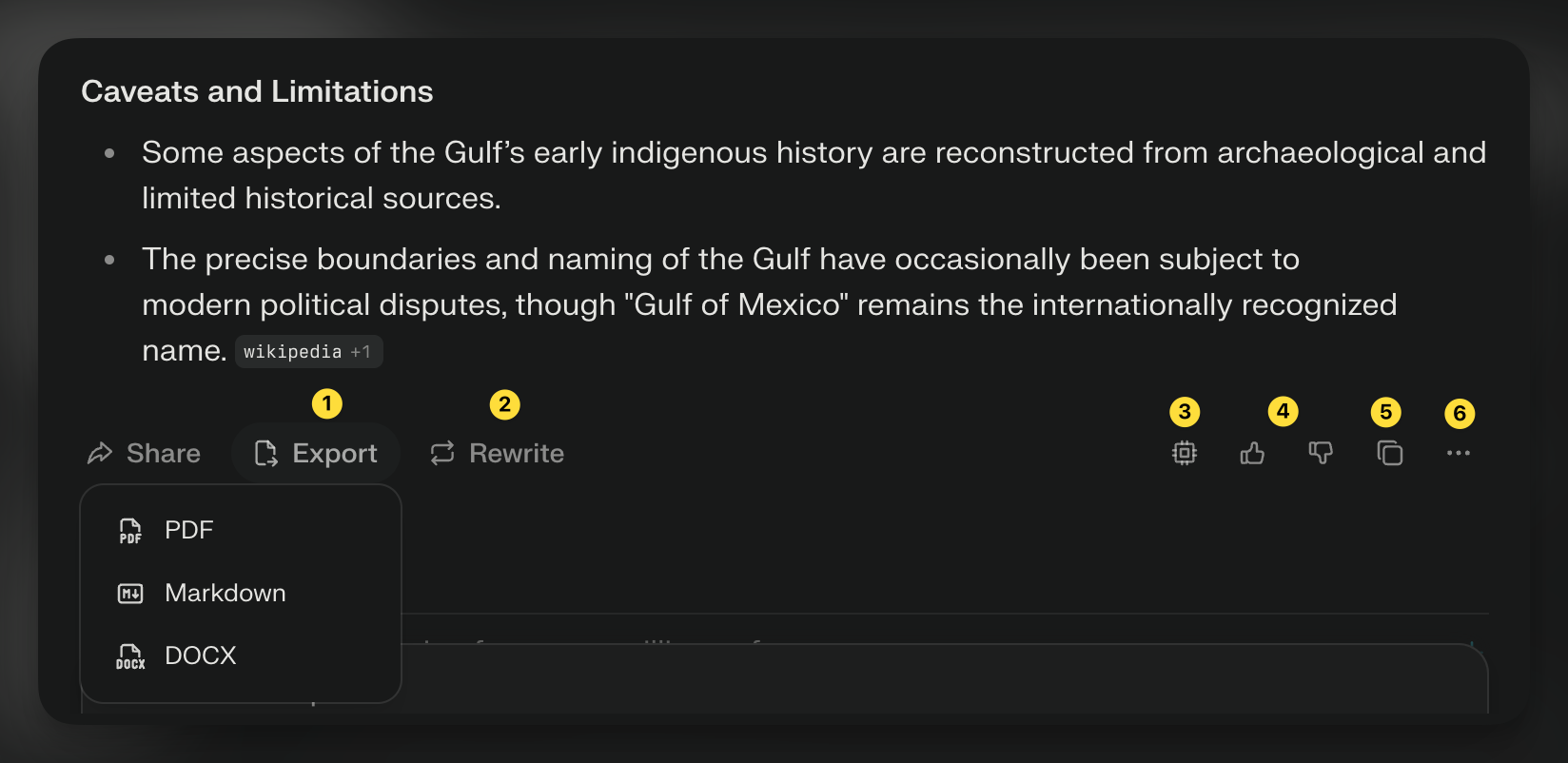
<p><b>More actions</b></p>

<Frame>
  <a href="../../assets/img/08a9b9f8ad_CleanShot_2025-07-31_at_16_34_50_402x.png" rel="noreferrer nofollow noopener" target="_blank">
    <img alt="" height="802" src="https://mintcdn.com/perplexity-help-center/Qv3d0vQE9qMlZrQx/help-center/assets/img/08a9b9f8ad_CleanShot_2025-07-31_at_16_34_50_402x.png?fit=max&auto=format&n=Qv3d0vQE9qMlZrQx&q=85&s=419d869be4fc627ce4a4e994482bf3db" width="1648" data-path="help-center/assets/img/08a9b9f8ad_CleanShot_2025-07-31_at_16_34_50_402x.png" />
  </a>
</Frame>

<ul>
  <li>
    <p><b>Export button</b> (1) allows you to <b>export the answer</b> to the session as PDF, Markdown, or DOCX</p>
  </li>

  <li>
    <p><b>Rewrite button </b>(2) <b>generates a new answer</b> using a different model that you can select</p>
  </li>

  <li>
    <p><b>Source button </b>(3) tells you info about <b>which Model, Search mode and Source mode was applied </b>to the answer</p>
  </li>

  <li>
    <p><b>Feedback</b> (4) share with a thumbs up/down if you're <b>satisfied or dissatisfied with the answer </b>provided</p>
  </li>

  <li>
    <p><b>Copy button </b>(5) <b>copies the answer</b> to your clipboard</p>
  </li>

  <li>
    <p><b>Three dots menu </b>(6): click this to view <b>Sources, Report feedback or delete</b> that portion of the session</p>
  </li>

  <li>
    <p><b>To edit the original query</b>, hover over the prompt and the edit icon will appear</p>
  </li>
</ul>

<Frame>
  <a href="../../assets/img/264d5f76be_CleanShot_2025-07-31_at_17_00_10.gif" rel="noreferrer nofollow noopener" target="_blank">
    <img alt="" height="151" src="https://mintcdn.com/perplexity-help-center/Qv3d0vQE9qMlZrQx/help-center/assets/img/264d5f76be_CleanShot_2025-07-31_at_17_00_10.gif?s=abc9cc608fe41c4e6604dfce463f9c60" width="800" data-path="help-center/assets/img/264d5f76be_CleanShot_2025-07-31_at_17_00_10.gif" />
  </a>
</Frame>

<h2 id="h_548338bed5">FAQs</h2>

<AccordionGroup>
  <Accordion title="Can I recover a deleted Session?">
    <p>Once a session is deleted, it cannot be retrieved. To prevent accidental deletions, we've added confirmation prompts.</p>
  </Accordion>

  <Accordion title="What happens to Sessions when I'm not signed in?">
    <p>When you create sessions while not signed into your Perplexity account, the author of the session is considered "anonymous," and therefore, the session is not saved long-term. These anonymous sessions will be visible for 14 days, after which they will disappear permanently without the possibility of recovery.</p>

    <p>To ensure that a session is accessible long-term, please sign into your account. All sessions created while signed in will be automatically saved to your session History.</p>
  </Accordion>

  <Accordion title="Are my Sessions private?">
    <p>Yes, your sessions are private and only for your reference by default. They only become public if you choose to share them.</p>
  </Accordion>
</AccordionGroup>


## Related topics

- [Features](/help-center/help-center/en/collections/18799290-features.md)
- [What is Brain?](/help-center/help-center/en/articles/19700001-what-is-brain.md)
- [What are Projects?](/help-center/help-center/en/articles/10352961-what-are-spaces.md)
- [What is Computer?](/help-center/help-center/en/articles/13837784-what-is-computer.md)
- [Technical capabilities of Sessions](/help-center/help-center/en/articles/10354775-technical-capabilities-of-threads.md)