Managing User Permissions
Empower your team with tailored access and security.
In this quick guide, we walk admins through managing user permissions for a secure and seamless experience in Perplexity Enterprise.
00:00 – Why Permissions Matter
00:18 – Where to Find Permissions 00:28 – Granular, Intuitive Controls
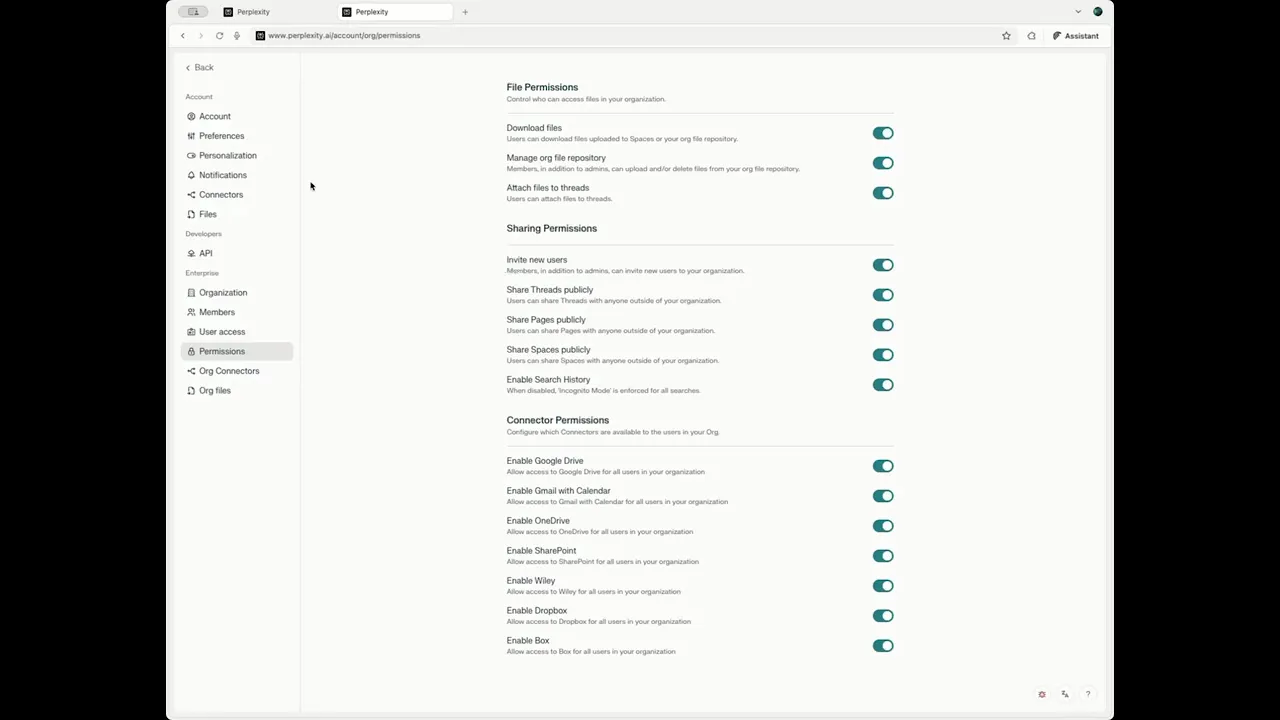
00:42 – File Permissions: Decide who can download, upload, or delete files, and attach files to threads.
01:07 – Sharing Permissions: Grant or limit the ability to invite new users and manage what content leaves your workspace.
01:30 – Search History: Enable thread history so your team can reference past work efficiently.
01:44 – Connector Permissions: Manage integrations with trusted tools like Google Drive, OneDrive, and enterprise data sources.
02:00 – Save & Review Regularly: Best practices to keep your org secure and maximize productivity.
Take control of your enterprise environment with Perplexity’s robust permission settings—so your team can move faster and stay secure.